
Certified payroll from Excel that checks itself before you sign it
EG Certified Payroll is certified payroll software that runs inside Excel on Windows and Mac, for contractors on federal and federally funded jobs. Set up each project and its crew once; every week it carries them into the new payroll, you enter the hours, and it fills the federal WH-347 form, both pages of the January 2025 revision. It works out the prevailing wage side for you: classification rates, overtime, fringe, gross per project, net. And it shows you every finding before you approve a payroll.
See the trial and the $199 license
Built by an Excel developer, not a template site.
Hundreds of custom Excel projects · 5.0★ client rating across 230+ reviews · Building Excel tools since 2010
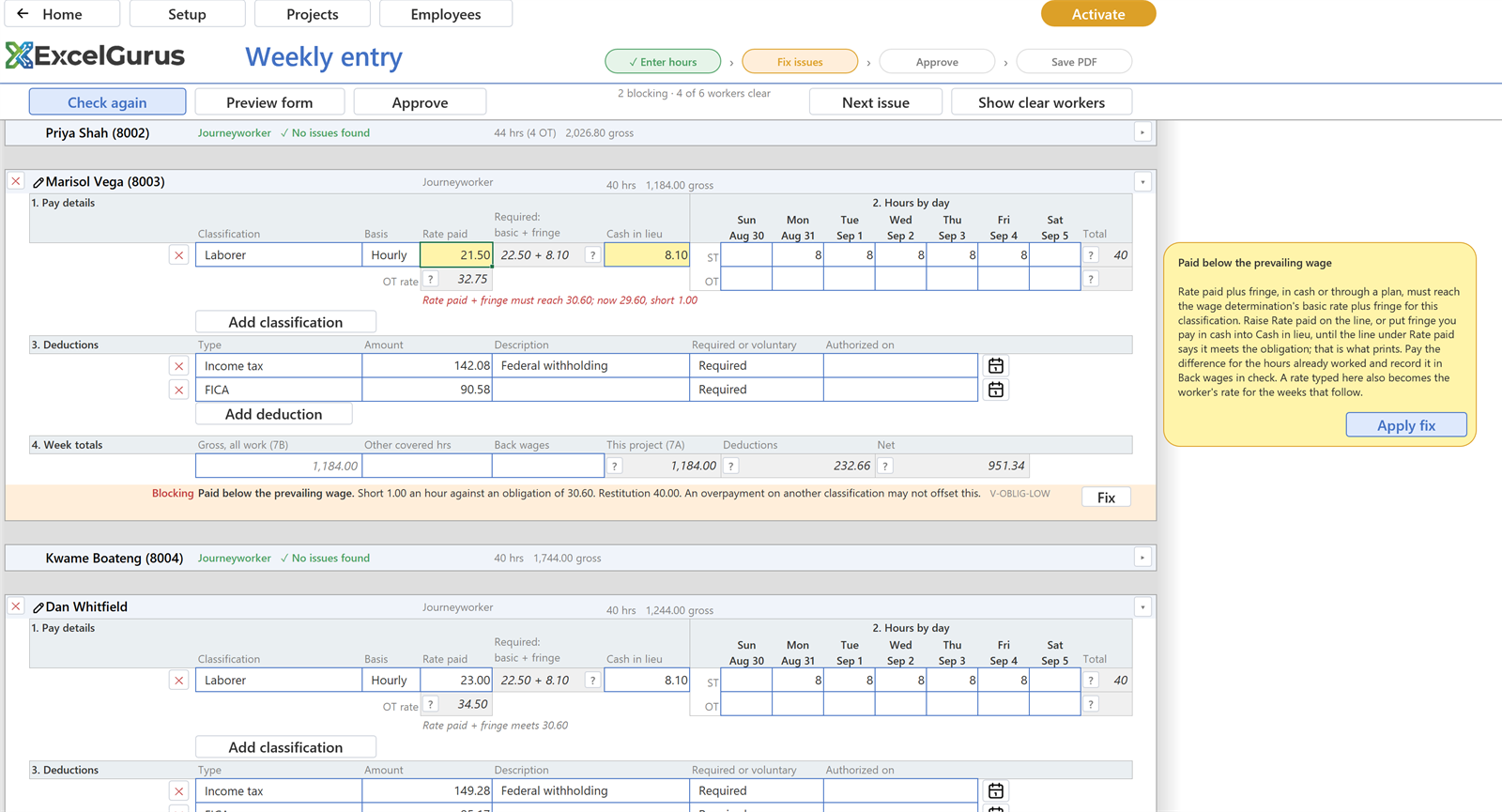
DOL’s own web form prints whatever you type. This one derives every figure from the wage determination, tells you which cell is wrong and by how much, and offers the fix. The two compared.
The full tour, 3:16. The whole weekly certified payroll in one Excel workbook.
What EG Certified Payroll does
A reporting layer over the payroll you already run. You enter hours and rates; it produces the certified payroll and shows you every finding before you sign it.
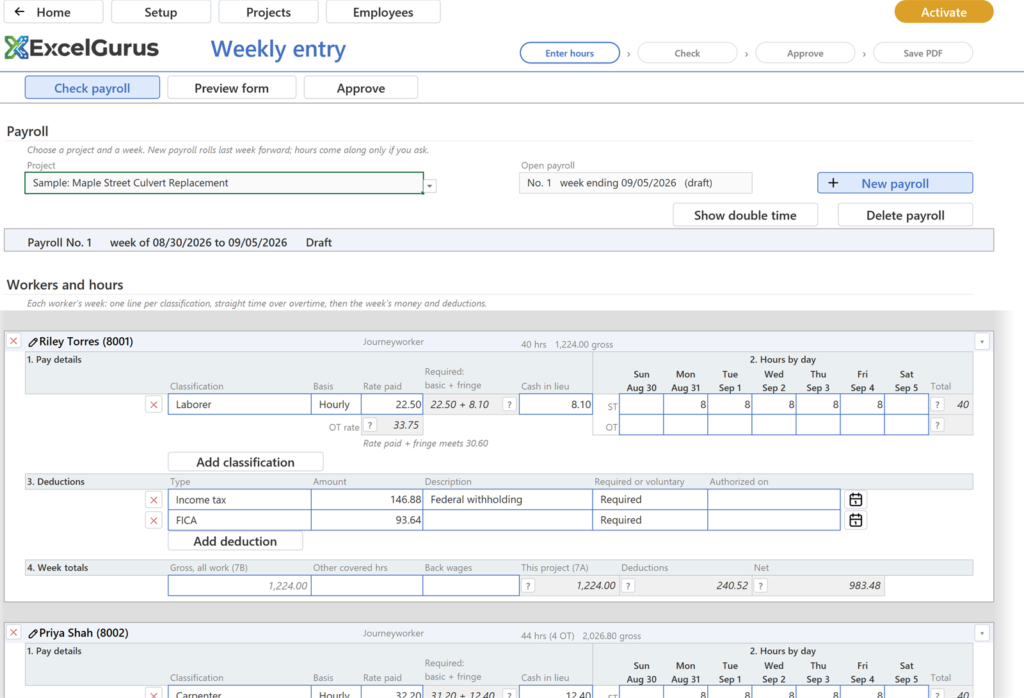
Weekly entry hours by day, one line per classification ▼
- The required rate is shown beside what you pay: basic plus fringe from the wage determination, so a short rate is visible before Check runs.
- Overtime is derived, not typed. The overtime rate follows the basic rate; the week’s gross, deductions and net follow the hours.
- New payroll rolls last week forward: the same workers and classifications, with hours only if you ask for them.
- Add a worker or remove one on the page; the sample project ships with two spare workers to try it on.
One card per worker: pay details and hours by day side by side, then deductions, then the week’s totals.
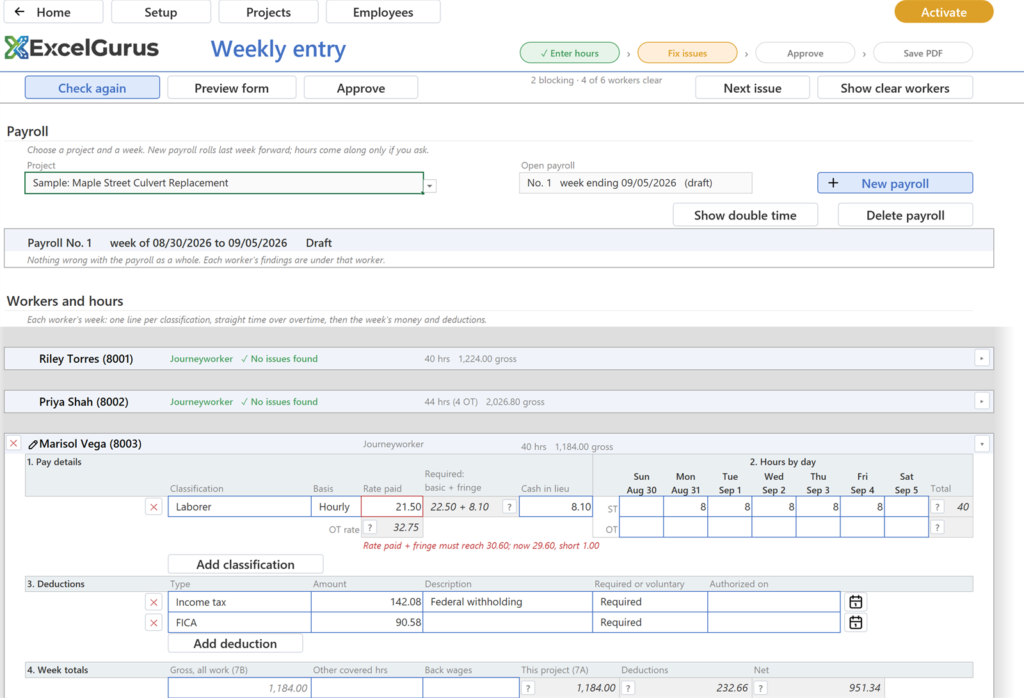
Check, Fix, Approve the part DOL’s form does not do ▼
- Paid below the prevailing wage: rate paid plus fringe short of the classification’s obligation, with the restitution owed.
- Missing identifying number, a worker with no hours in the week, and the other rules a reviewer would catch.
- Fix takes you to the cell, and Apply fix corrects a rate to meet the obligation in one click.
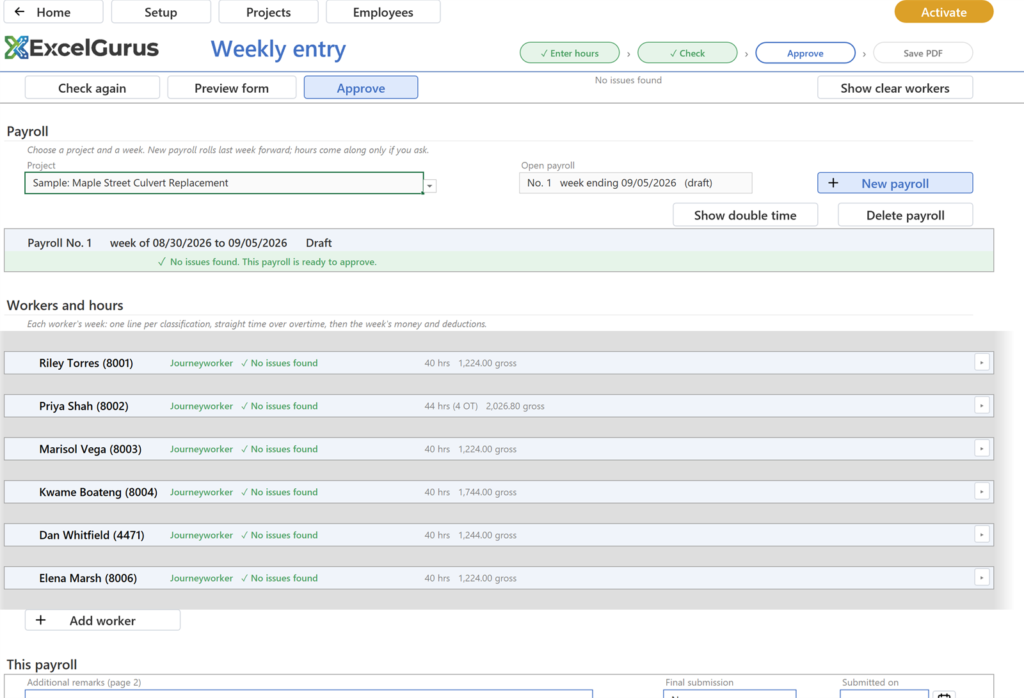
- Approve freezes the figures. An approved payroll cannot be edited by accident; Reopen it to change anything, and the form reprints from the approved figures exactly as they were.
After the fixes: no issues found, Approve lit, every worker clear.
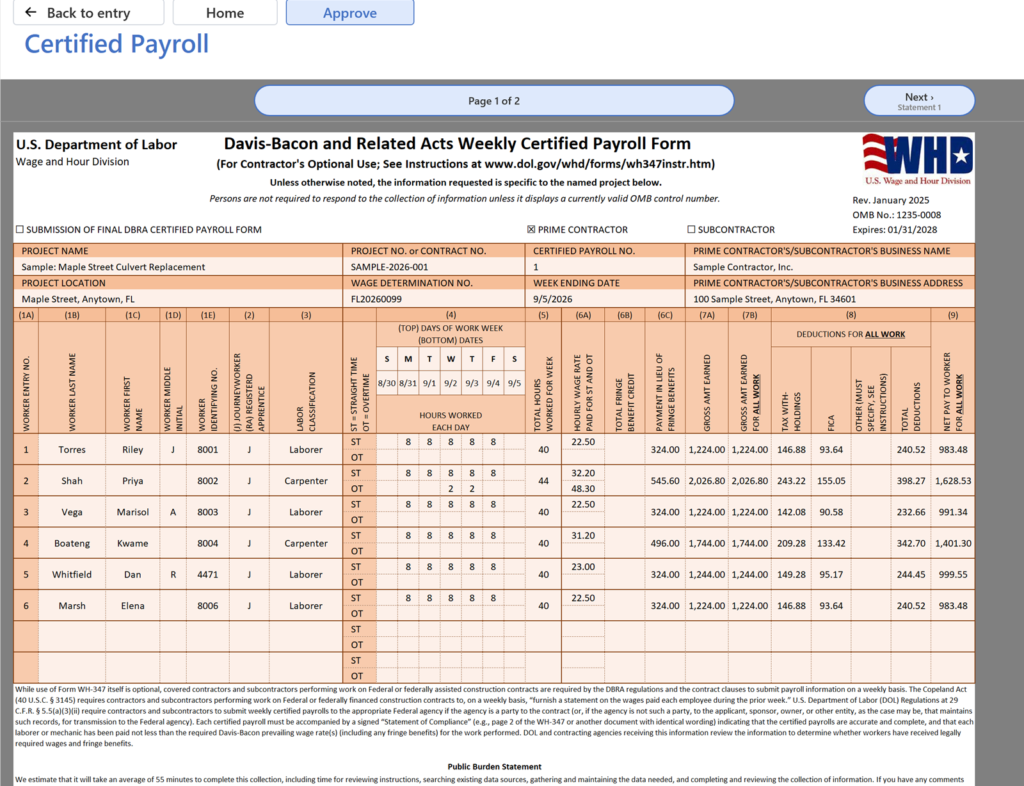
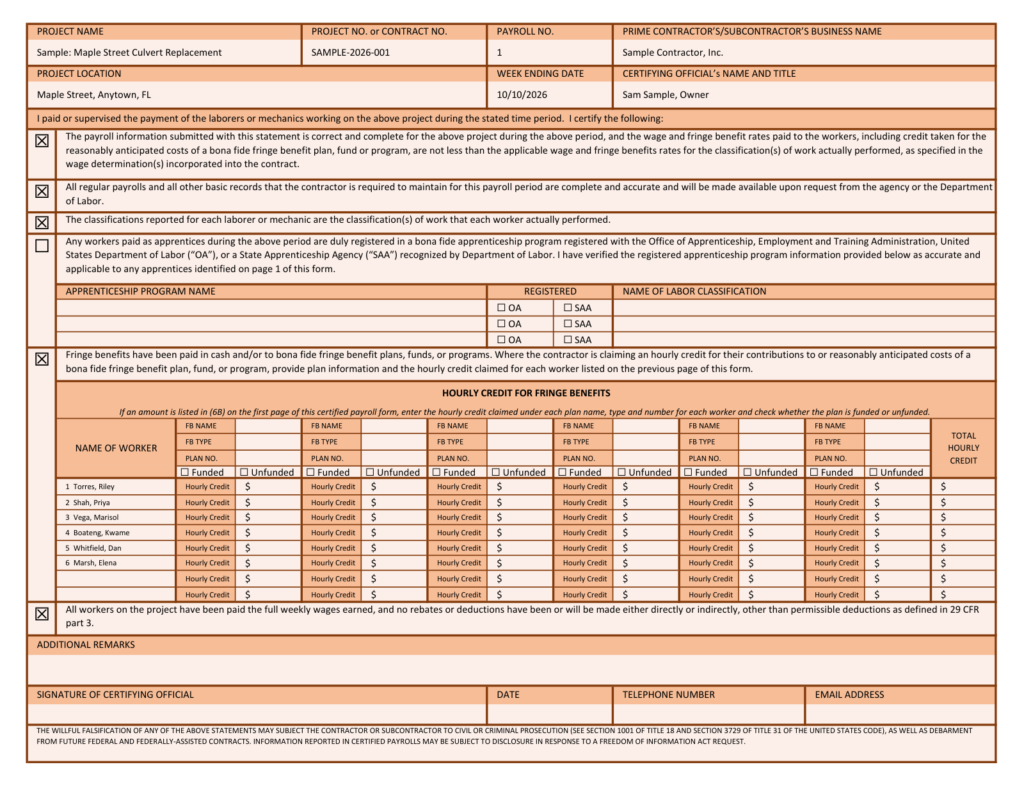
The printed form WH-347, January 2025 revision, both pages ▼
- Every page of a long payroll carries its own Statement of Compliance, as the form requires.
- Save PDF writes the pages to a Certified payrolls folder beside the workbook, ready to submit.
- Approved payrolls are archived as snapshots, so a payroll certified in March reprints in September exactly as it was, even after a rate or a classification changed.
Page 1 as it prints on a licensed copy. Page 2, the Statement of Compliance, follows it.
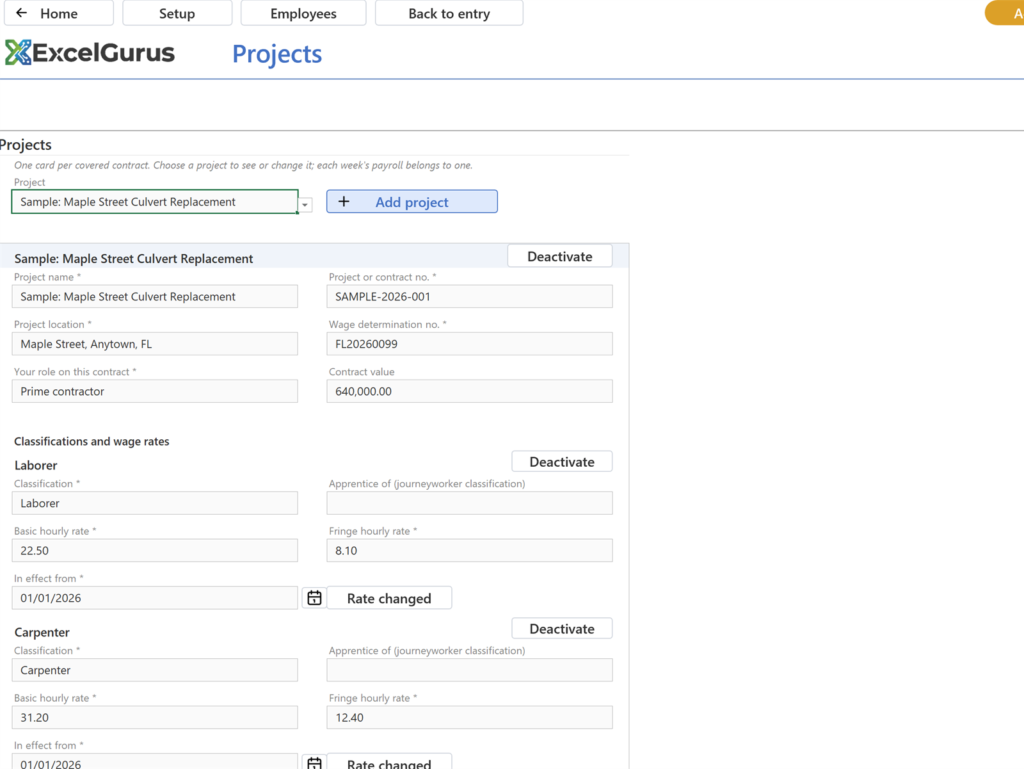
Projects, classifications and rates the wage determination, once per project ▼
- Basic rate and fringe per classification, with a dated history: change a rate from a given date and earlier weeks keep the rate they were paid under.
- Apprenticeship programs with their levels, and fringe plans paid to a fund rather than in cash, so what prints matches what was paid.
- Deactivate and restore a finished project instead of deleting it; its payrolls stay reprintable.
A project’s card and its classifications, each rate with the date it took effect.
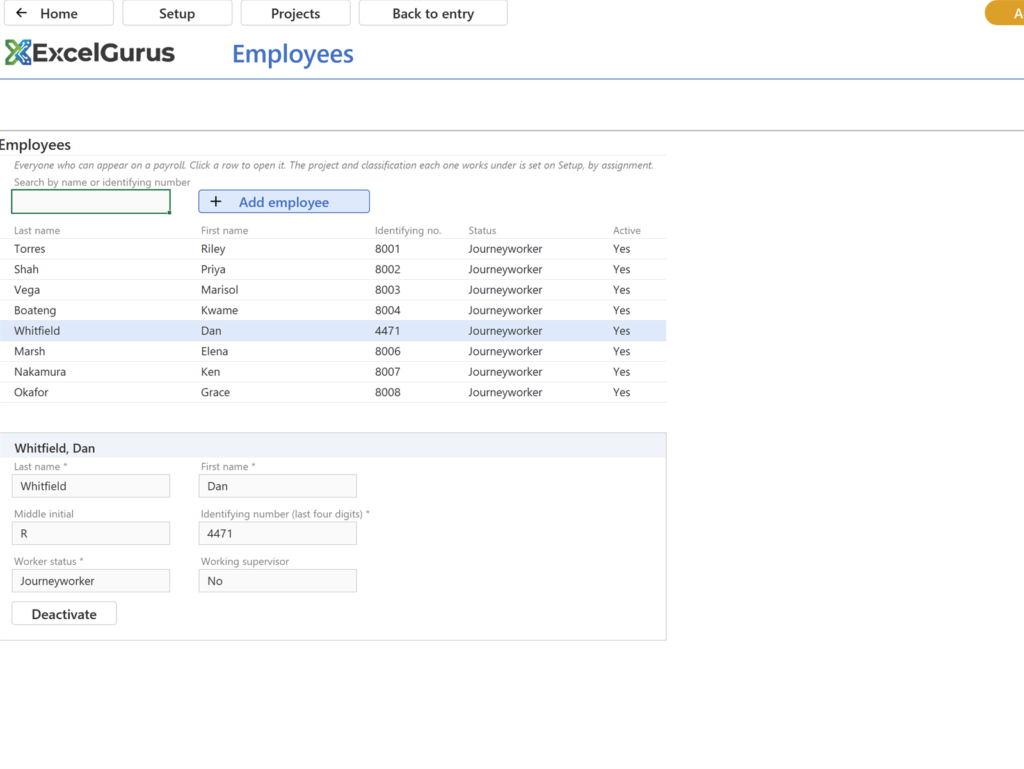
Employees name, identifying number, status ▼
- No Social Security numbers and no contact details are held anywhere in the workbook. The form wants four digits, so that is what is stored.
- Assign an employee to a project’s classifications once, and the weekly page knows the rate that applies.
The list, and a card that opens when a row is clicked.
A sample project to try it on one click from Home ▼
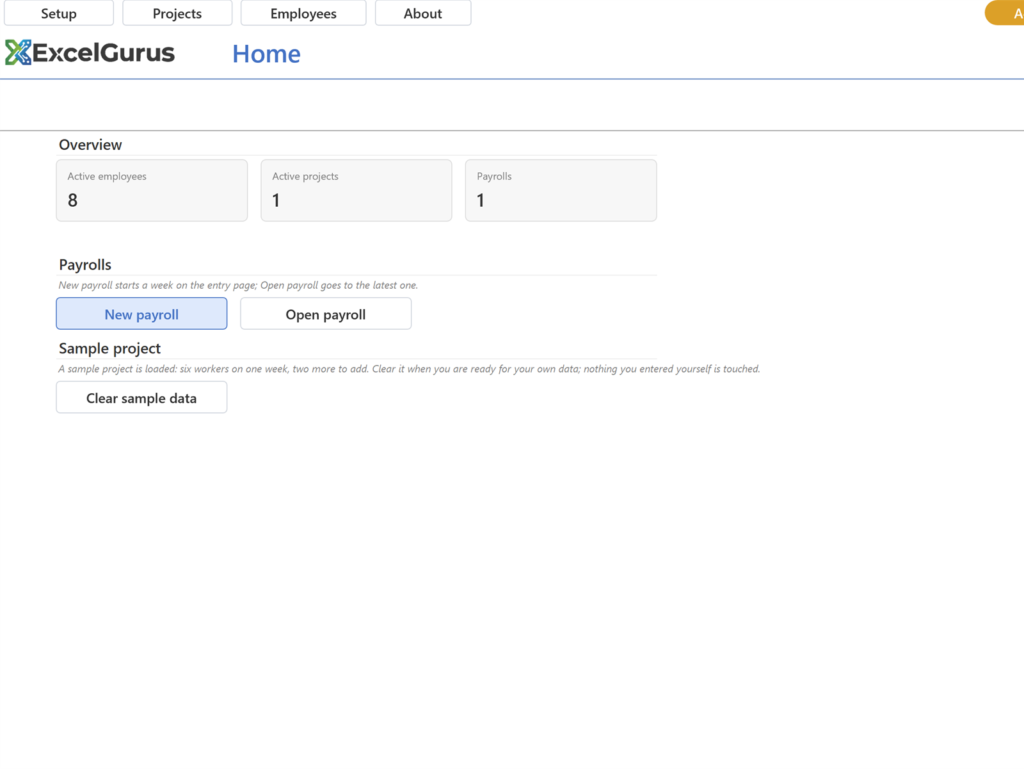
Home with the sample loaded; Clear sample data takes it away again.
What it deliberately does not do. It never computes tax withholding; the deductions you enter are the deductions that print. It holds no Social Security numbers and no contact details. And it certifies nothing: approving a payroll freezes its figures, and the contractor signs the Statement of Compliance and files it. The software prepares the form; the responsibility for what is on it stays where the law puts it.
Who built this workbook
EG Certified Payroll comes from the same developer behind hundreds of custom Excel projects. These are reviews of that work.
★★★★★
“Most likely one of the best freelancers I’ve had the opportunity of working with. I would highly recommend David for any complex VBA coding. We’ll be working with him again in the future.”
VBA Development Client · via Upwork, 2020
★★★★★
“David does phenomenal work. We brought him in during the middle of a project and he was able to pick up a significant workload very quickly. His communication and ability to hit deadlines early was great. He was a true pleasure to work with and his work was outstanding.”
Report Creation Client · via Upwork, 2022
Includes
- ✓ Weekly entry with derived overtime, gross and net
- ✓ Check, Fix and Approve
- ✓ Projects, classifications and dated rates
- ✓ The rendered WH-347, both pages, to PDF
- ✓ Approved payrolls archived as snapshots
Every printed page is marked TRIAL COPY / NOT FOR SUBMISSION.
Download the trialA signed setup program for Windows. What it installs and how to uninstall it are set out under the plans, with the license agreement.
On a Mac, the same button gives you the workbook itself, for Excel for Mac (Microsoft 365 or Excel 2024).
Adds
- ✓Clean formsNo TRIAL COPY mark on any page, for every payroll, past and future.
- ✓Unlocks in placeClick Activate at the top right of Home and enter your key. Your projects, employees and payrolls stay exactly where they are.
- ✓Move it when you need toDeactivate this machine from the About page and activate on the next one.
The key arrives by email the moment the purchase completes.
Buy $199What the setup program does
EG Certified Payroll (WH-347) is software for preparing certified payroll (Form WH-347) that runs inside Microsoft Excel, on Windows or Mac. It fills Form WH-347 from the hours you enter and checks every line against the prevailing wage before you sign. The trial download is a setup program signed by ExcelGurus LLC that installs it as an Excel workbook (.xlsm).
- Installs the workbook and its icon in Documents\ExcelGurus\EG Certified Payroll (WH-347) (you can choose another folder), Start menu shortcuts, a desktop shortcut you can untick, and its uninstaller and settings in your Windows user profile. When it finishes it opens the workbook, unless you untick that box.
- Excel setting: a box, ticked by default, adds that folder and its subfolders to Excel’s Trusted Locations, so the workbook normally opens with no macro warning. Untick it and Setup leaves Excel as it is.
- No administrator rights. It installs for your Windows user only. Needs Windows 10 or later and Excel for Windows. On a Mac there is no setup: download the workbook and open it in Excel for Mac.
- Internet: Setup itself sends nothing. The workbook shows the license agreement again the first time it opens; once you accept it there, it tells our server that a copy has been opened, then checks in normally once a day when it is opened. These messages carry the product, its version, whether a license is active and anonymous identifiers, including a random installation ID that Setup keeps in your Windows user profile. They never carry anything from your spreadsheets (what is sent, and what a paid license adds).
- Uninstall in Windows Settings > Apps > Installed apps (Apps & features on Windows 10 and early Windows 11): find EG Certified Payroll (WH-347) and choose Uninstall. It removes the Excel setting, the shortcuts and its own settings, and asks whether to delete the folder, which also holds the payroll PDFs you saved; No, the default, keeps them.
Setup shows the license agreement before it installs anything. License agreement (EULA) and terms · Privacy Policy · Full uninstall steps
Already using the trial? Keep your file. Buying a license unlocks it in place, nothing to move or re-enter.
Questions before you start? Read the setup guide, the certified payroll guides, or contact support.
Common questions
Does it file or certify the payroll for me?
No. It prepares Form WH-347 from your figures and checks them against the wage determination you entered. Approving a payroll in the workbook freezes those figures so the form reprints the same way later; it is not a certification. You sign the Statement of Compliance and submit it the way your contracting agency asks.
What happens when DOL revises the form?
The January 2025 revision is what ships today, and this download keeps serving it for as long as a past payroll might need reprinting. When DOL issues the next revision it becomes its own edition of the product, and the terms for existing license holders will be published with it.
Will it run on my Mac?
Yes, in Excel for Mac (Microsoft 365 or Excel 2024). Download the workbook itself rather than the setup program, open it in Excel and click Enable Macros when Excel asks. On a Mac, Save PDF puts each payroll’s PDF in a Certified payrolls folder beside the workbook; the first time, macOS may ask you to let Excel save there.
Is this a fillable WH-347?
Not a fillable PDF. It is software that runs in Excel on Windows or Mac: you enter each week’s hours, and it fills both pages of the January 2025 WH-347 and saves them as a PDF, with the project and crew carried to the next week. If you only need a single payroll, the DOL’s free Online Fillable WH-347 Form may be all you need. The DOL’s WH-347 page.