
Fillable WH-347: The DOL’s Free Online Form or an Excel Workbook
Use the Department of Labor’s free WH-347 web form for an occasional payroll, and a workbook that keeps your project and your crew for a payroll you file every week. The difference is what you type again. The web form keeps nothing between visits, so every week starts blank: the project, each worker, each classification and rate, the certifying official. A certified payroll workbook such as EG Certified Payroll holds all of that from the first setup. Each new week opens with the same workers, classifications and rates already in place and the payroll number moved on, and what is left is the week’s hours, or last week’s hours carried over to change where this week was different.
Looking for the DOL’s fillable form itself? Where to get Form WH-347 links its Online Fillable WH-347 Form, with the blank PDF and the DOL’s annotated guide.
Watch it done, 2:16. Week two on the sample project in EG Certified Payroll: New payroll offering the next week, payroll No. 2 with the same crew and rates, last week’s hours and deductions brought along only with the box ticked and marked as not changed yet, one day changed, and the same check before approval.
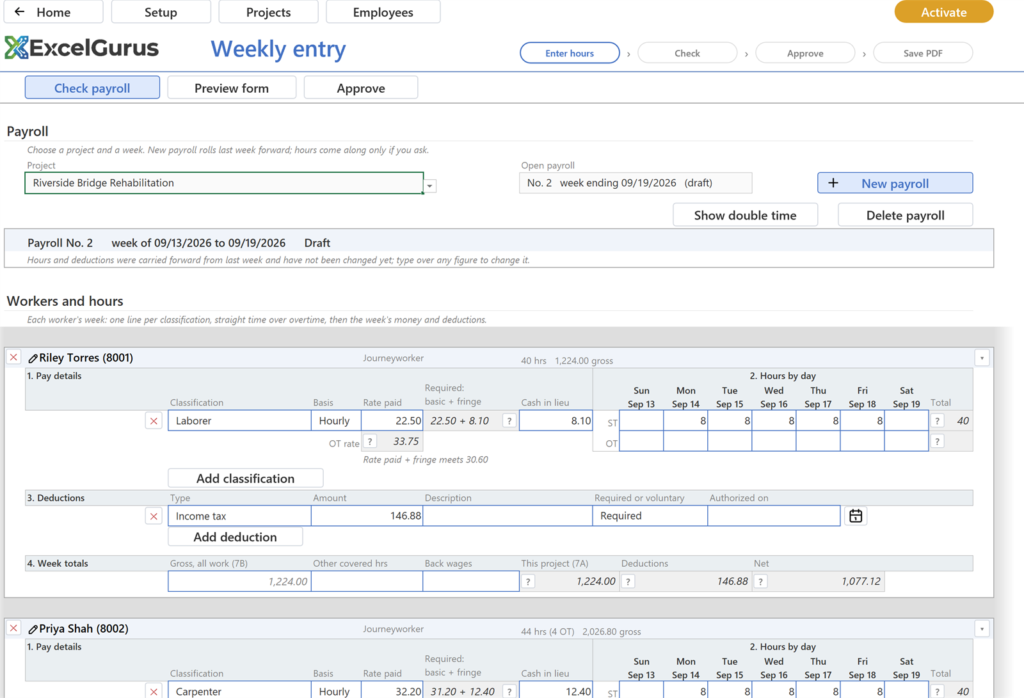
Payroll No. 2, rolled forward from week 1 with the box ticked: the same workers, classifications and rates, and last week’s hours and deductions ready to change. Screen from EG Certified Payroll (WH-347), the Excel workbook that does this.
What you type each week
| Item | DOL web form | EG Certified Payroll |
|---|---|---|
| Project, contract number, wage determination number | Every week | Once, when you set up the project |
| Each worker’s name, identifying number and status | Every week | Once, on the employee record |
| Classifications and rates | Every week, for every worker | Once per project, each rate with the date it took effect |
| Certifying official’s name and title | Every week | Once, in Setup |
| Payroll number and week ending | Every week | Filled in: the next number, and the next week offered |
| Hours by day | Every week | Every week, or last week’s carried over to change |
| Deductions | Every week | Every week, or carried over with last week’s hours |
| Overtime rate | Every week | Never: derived from the basic rate |
Set up once
A project holds its contract number, location and wage determination number, and the classifications from that determination with their basic rate and fringe, each dated, so a later change does not rewrite an earlier week. An employee record holds the name, the last four digits of the identifying number the form asks for, and whether the worker is a journeyworker, a registered apprentice or a trainee. Assign each employee to the project’s classifications once, and the weekly page knows the rate that applies. Setup holds the company and the certifying official who signs page 2.
Every week after that
- New payroll. Pick the week. The week ending offered is the next one, and the payroll number goes up by one.
- The crew is already there. The new week starts with last week’s workers, their classifications, their rates and any cash paid in lieu of fringe. Someone new this week is added on the page; someone who has left is removed.
- Hours: type them, or carry them. Leave Carry last week’s hours forward clear and type this week’s hours. Tick it, and last week’s hours and deductions come along, with a note on the payroll that they have not been changed yet; type over only the days that were different. The box starts clear every week on purpose: copied hours look right even for a worker who was out.
- Check, Approve, Save PDF. The overtime rate, gross and net are worked out from the hours. Check compares each line with the wage determination before you approve, and Save PDF writes both pages, ready to submit.
When the DOL form is enough
For a single payroll, or a job of a week or two with a small crew, the web form does the job at no cost: it runs in a browser, adds up gross pay, deductions and net pay, and prints a clean form. The Department of Labor says the data you type never leaves your computer, which is also why nothing is there for next week.
Common questions
Does the DOL’s WH-347 web form save my payroll for next week?
No. It has no button to save a payroll or open one again, and reloading or closing the page clears it, so each week is typed from the start. Keep the PDF you print for your records.
What carries over to a new week in EG Certified Payroll?
The workers, their classifications, their rates, any cash paid in lieu of fringe and their fringe plans. The payroll number moves on and the next week is offered. Hours and deductions come along only when you tick Carry last week’s hours forward.
Is the DOL’s WH-347 web form free?
Yes. It runs in a web browser with nothing to install and no subscription. EG Certified Payroll has a free trial, the full workbook with every printed page marked TRIAL COPY, and a one-time license of $199 to file with it.
Check it before you sign it
EG Certified Payroll keeps the project and the crew between weeks. New payroll rolls last week forward, the hours come along only if you ask, and Check compares every line with the wage determination before you approve. Set it up once; after that, each week is mostly the hours. The video near the top of this page makes week two on the sample project: the next week and payroll number offered, last week’s hours brought along only with the box ticked, one day changed, and the same check before approval.
See EG Certified Payroll (WH-347)Free trial, the full product; every printed page carries a TRIAL COPY mark until a license is activated. Excel for Windows or Mac.
More in this series: Certified Payroll in Excel: What a Spreadsheet Has to Get Right · How to Fill Out Form WH-347, Column by Column · All certified payroll guides
★★★★★
“Most likely one of the best freelancers I’ve had the opportunity of working with. I would highly recommend David for any complex VBA coding. We’ll be working with him again in the future.”
VBA Development Client · via Upwork, 2020
5.0★ across 230+ client reviews · 100% Job Success on Upwork · Building Excel tools since 2010 · Read the reviews →