
Reporting Services on GSA TDR: Hourly, SCLS, Fixed Price and Cloud SIN Rows
ExcelGurus is not affiliated with, endorsed by, or acting for the U.S. General Services Administration (GSA). This guide describes GSA’s published instructions as of MAS TDR User Guide v2.0 (September 2026), as read on October 22, 2026; GSA updates them, so check its current pages before you report. It is not legal or tax advice.
How a services sale is reported on GSA TDR depends on how the task order is priced. Hourly labor is one row per labor category on each order, under User Guide Table 5.5: the month’s hours and the hourly rate as invoiced, HR for standard hours and OT for non-standard hours, and the title exactly as on your GSA price list unless a UCID ties the row to your catalog. An SCLS labor category adds its wage determination and revision to the description, as LCN:, WD: and REV:. A fixed price order is reported as invoiced under Table 5.4, with 1I as the unit when the invoice gives none. A row on the cloud SIN also names its cloud service type. EG TDR Reporter, an Excel workbook for Windows, prepares and checks these rows from your invoice export.
Which of GSA’s tables applies
User Guide Table 5.1 sorts services by how the order or CLIN is priced, and each kind has its own reporting table:
| Order or CLIN | Report | User Guide table | Supporting documents |
|---|---|---|---|
| Hourly priced labor categories (labor hours, time and materials) | One row per labor category | 5.5 | Not needed: the rows carry the detail |
| Fixed price labor categories, and fixed price services or solutions | As invoiced | 5.4 | For orders over $1 million in total contract value awarded after July 1, 2026 |
| Configurable services, priced by usage, duration or transactions | By how the service is listed on your FCP Services Plus File | 5.2, 5.3, 5.4 or 5.5 | When line item detail cannot be given |
| Order-level materials under the OLM SIN, other than products with a part number | As invoiced | 5.4 | Not needed |
On a firm fixed price task order with labor hour or time and materials CLINs, SRP’s upload instructions apply the hourly rules to those CLINs. Table 5.1 marks supporting documents for fixed price services or solutions simply as required; Table 5.4 and GSA’s Help with TDR page give the $1 million and July 1, 2026 limits.
Hourly labor categories (Table 5.5)
- One row for each labor category on each order, with the month’s hours as the quantity and the hourly rate as the price paid per unit, both as stated on your invoice. In GSA’s own example 6.3.3, two help desk technicians working the same order at the same rate are one row of 329 hours.
- Description of Deliverable. Without a UCID, the labor category title exactly as on your GSA price list; an internal name such as “Sr. Systems Engineer” draws a compliance flag. With a valid UCID from your FCP Services Plus File in the UCID column, still enter the title, but it need not match character for character.
- Unit. HR for standard hours and OT for non-standard hours, overtime, holiday or hazard pay for example, when you have an FCP catalog file; with a Price Proposal Template, the unit on your PPT. Avoid EA, which the User Guide says may cause a rejection. SRP’s upload instructions also list XH for non-standard hours and ask for standard and non-standard hours on separate rows.
- SIN. The SIN the order was placed under, awarded on your contract; for an order under several SINs, the SIN with 51% or more of the order’s value.
- Price. The rate as invoiced. GSA’s Help with TDR page asks for monthly reports to carry the total price with the IFF in it.
SRP’s upload instructions show an LCN: prefix even on a labor category without SCLS (their example is LCN:Mechanical Engineer 3). User Guide v2.0 asks for the title alone and keeps LCN:, WD: and REV: for SCLS labor categories; this guide follows the User Guide.
Check the arithmetic, even in GSA’s examples. Example 6.3.3 prints 329 hours at $88.75 and a total of $28,400.00; those do not multiply, and SRP rejects a file whose total is not the quantity times the price.
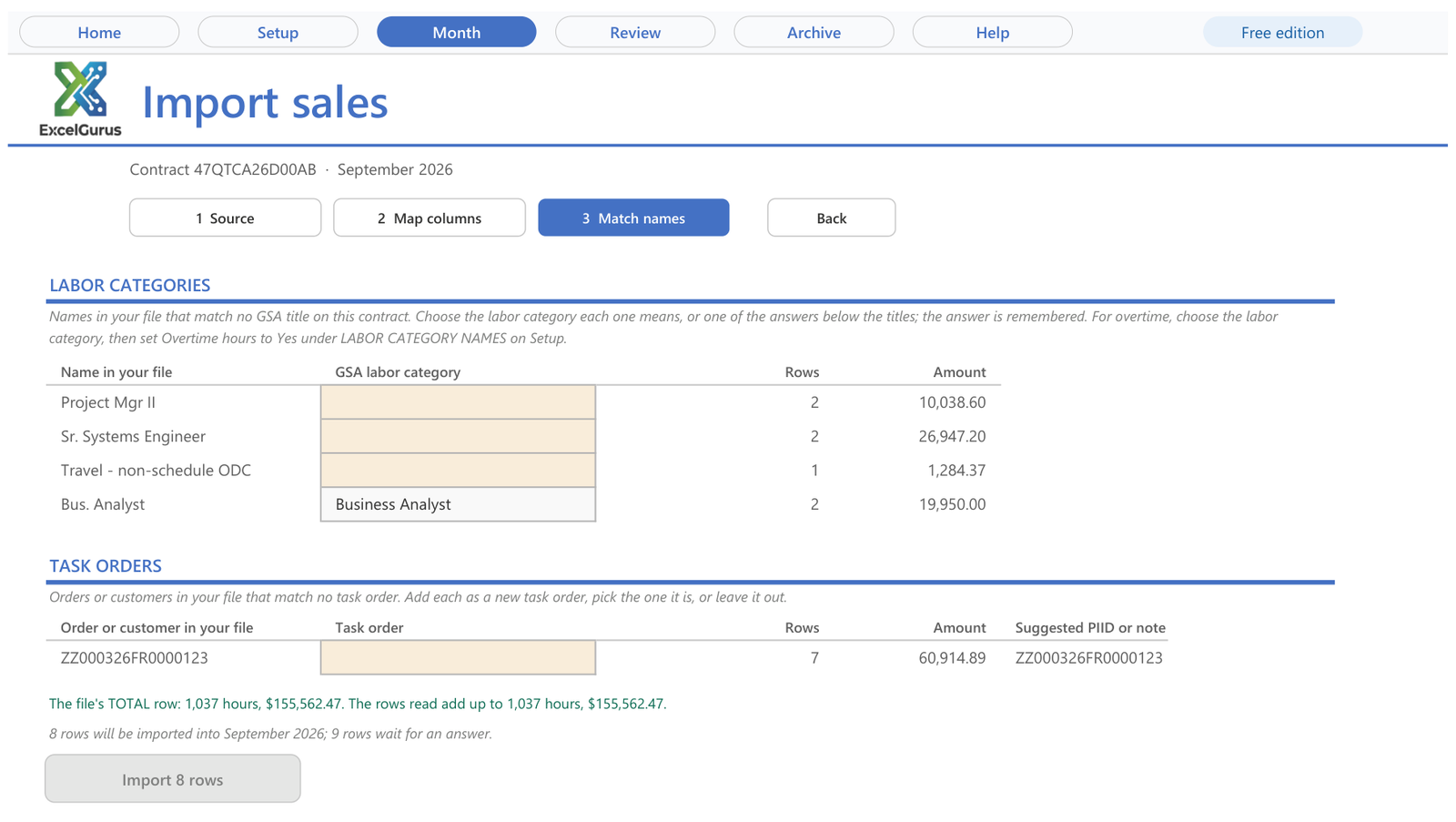
Names in your export that differ from your GSA price list are matched once to the exact GSA title, and the answer is remembered. Screen from EG TDR Reporter, the Excel workbook that prepares and checks this file, with sample data.
SCLS labor categories
Labor categories subject to the Service Contract Labor Standards (SCLS) are reported like the others: hourly under Table 5.5, fixed price under Table 5.4. On an hourly row, Table 5.5 adds the wage determination (WD) and its revision to the description, in this format, punctuation included:
LCN:<title on your GSA price list>, WD:<wage determination number>, REV:<revision number>, for example LCN:Administrative Support, WD:2015-4623, REV:29.
- Which wage determination. The one applicable to the task order, based on its location. Table 5.5 points to GSA’s SCLS page for the current MAS numbers, a list the User Guide says is generally updated once a year through the MAS solicitation refresh (the latest listed when we read it: Refresh #33, October 2026), so check the revision after each refresh.
- No spaces after the colons. SRP’s upload instructions ask for the prefixes without spaces so the entry can be validated. They spell the last one Rev:; the User Guide writes REV:.
- With a UCID, GSA’s example 6.3.3 writes only
WD:2015-4623, REV:29. The full form, with the title, is what Table 5.5 itself asks for.
Fixed price services and solutions (Table 5.4)
- As invoiced. The description of the services provided, the unit, the quantity and the price per unit as on the invoice. When the invoice gives no unit, enter 1I: a one and the capital letter I, as in India, which SRP’s Table 1 calls FIXED RATE. GSA’s example 6.3.1 reports its fixed price solution, ENG SYS DESIGN PH-1 at $1,500,000.00, in EA, as invoiced.
- UCID. When the fixed price service or solution has a UCID on your FCP Services Plus File, enter it exactly. A solution put together for one order from your price list has none, and the field stays blank.
- Installment or progress payments are reported as invoiced, quantity and unit included.
- Supporting documents. For an order over $1 million in total contract value awarded after July 1, 2026, Table 5.4 asks for the government’s PWS, SOO or SOW, as the government wrote it, to be uploaded once in SRP; the Help page words it as orders made after July 1, 2026. Never upload classified documents or sensitive proposal documents.
Configurable services
A configurable service, priced by usage, duration, transactions or consumption rather than one flat fee, has had no table of its own since User Guide v2.0. Report it under the table that matches how it is listed on your FCP Services Plus File: a product (Table 5.2), a highly configurable product (5.3), a fixed price service or solution (5.4) or a labor category (5.5). Where your accounting cannot give line item detail, supporting documents are required.
The cloud SIN, 518210C
Sales under the cloud SIN 518210C carry a Cloud Service Type in column R: IaaS, PaaS, SaaS, or LCAT for IT professional services labor categories. SRP’s upload instructions apply it to SINs that begin with 518210C too, such as 518210CSTLOC. On every other SIN the column stays blank. The User Guide’s tables print the labor code with a space inside the quotes (“LCAT “); the value SRP lists is the four letters LCAT. Cloud Service Type is one of the six fields in GSA’s trial period, which runs from July 1 to December 31, 2026.
SRP’s upload instructions also still ask for the designation in the description of a cloud SIN row. User Guide v2.0 puts the type in column R and keeps each table’s description rule, so a labor category’s title stays exactly as on your price list; this guide follows the User Guide.
Travel, materials and other order-level items
Order-level materials (OLMs) are items bought in direct support of an order that were not known when the contract or BPA was awarded, so their prices are not on your contract. User Guide section 3.3.1 reports them under the scenario that fits: Table 5.2 for products with a valid manufacturer part number, Table 5.4 for any other item or service under the OLM SIN. An OLM bought from another MAS contractor is that contractor’s sale to report, with its IFF. SRP’s upload instructions ask for non-hourly components, travel expenses to a client site for example, to be described as you invoice them. For travel or freight in your total pricing, the Help page refers you to the Vendor Support Center’s OLM FAQs.
In EG TDR Reporter
This version reports services, not products. On Setup, each task order has a pricing (Labor hour or T&M, Fixed price (order level), or Configurable or miscellaneous), and each price list item a type, SCLS labor category among them.
- An hourly row’s description is the GSA title from Setup; an SCLS row is written as LCN:, WD: and REV: from the task order’s SCLS WD and WD revision.
- For overtime, set Overtime hours to Yes for that name under LABOR CATEGORY NAMES on Setup; those rows are written in OT.
- On a cloud SIN, a labor category’s row gets LCAT unless the item has its own cloud type.
- Review holds back the file for EA on hourly labor, or a cloud type missing on a cloud SIN or set on any other SIN. It warns when an SCLS description lacks its wage determination or revision, and when a fixed price order’s Awarded date and Order value (ceiling) call for supporting documents.
Common questions
Do I report each employee or each labor category?
Each labor category, once per order. User Guide Table 5.5 asks for each labor category individually, with its hours for the month and the hourly rate as invoiced. In GSA’s own example, two help desk technicians working one order at the same rate are a single row of 329 hours. Standard and non-standard hours of the same labor category go on separate rows, in HR and OT.
What unit do I use for a fixed price task order?
The unit on the invoice. If the invoice gives none, enter 1I, a one followed by the capital letter I, which SRP’s unit table calls FIXED RATE. Hourly labor is different: HR for standard hours, OT for non-standard hours, and not EA.
What does a cloud SIN row need that other rows do not?
A Cloud Service Type in column R: IaaS, PaaS, SaaS, or LCAT for a labor category. It applies to SIN 518210C and, in SRP’s upload instructions, to SINs that begin with it; the column stays blank on every other SIN. It is one of the fields in GSA’s trial period, which runs from July 1 to December 31, 2026.
Check every row before it reaches SRP
EG TDR Reporter prepares and checks the monthly upload file for a MAS services contract from your accounting export: hourly and SCLS labor categories, fixed price and configurable services, discounts, returns and cloud SINs. It matches each row to your GSA price list and task orders, checks every row against GSA’s published reporting rules, and fills the template you download from SRP. You upload the file in SRP and pay the IFF yourself.
See EG TDR ReporterOne free month per GSA contract, no card needed. Excel for Windows.
Sources
GSA’s own pages, as read on October 22, 2026. They change; the current versions are the ones that count.
- GSA, Multiple Award Schedule TDR User Guide, Version 2.0 (PDF) (www.gsa.gov), updated September 2026: section 2.3.2, sections 3.2.1 to 3.3.1, Tables 4.1, 5.1, 5.4 and 5.5, examples 6.3.1 and 6.3.3, and the version history
- GSA, Help with Transactional Data Reporting (www.gsa.gov), last updated Oct 8, 2026
- SRP user guide, MAS File Upload Instructions (srp.fas.gsa.gov)
- GSA, SCLS wage determinations applicable to MAS contracts (www.gsa.gov), last updated Oct 2, 2026
- SRP user guide, MAS Tables (units of measure, non-federal entity and federal customer codes) (srp.fas.gsa.gov)
More in this series: How to Prepare Your Monthly GSA Sales Reporting (TDR) Upload File · GSA “Cannot Find Items”: Matching Labor Category Titles, UCIDs and Units · Credits, Returns and Discounts on a GSA TDR Report · All GSA Sales Reporting guides
★★★★★
“Most likely one of the best freelancers I’ve had the opportunity of working with. I would highly recommend David for any complex VBA coding. We’ll be working with him again in the future.”
VBA Development Client · via Upwork, 2020
5.0★ across 230+ client reviews · 100% Job Success on Upwork · Building Excel tools since 2010 · Read the reviews →