
Certified Payroll in Excel: What a Spreadsheet Has to Get Right
Excel can produce a compliant certified payroll, and many small contractors do exactly that. A blank WH-347 template is not the same thing. The form has rules behind every column, and a spreadsheet that only draws the boxes leaves every rule to the person typing. A sheet that is safe to sign keeps one line per worker per classification, derives the overtime rate and the totals rather than accepting them typed, holds the wage determination rates with the dates they took effect, compares what is paid against what is required before printing, freezes an approved payroll so it reprints exactly as filed, and never stores a Social Security number.
Watch it done, 3:58. The four tests from this guide on the sample project in EG Certified Payroll: the rules with their dates, the derived figures, a rate a dollar short caught beside the required rate and fixed by Check, then Approve and both pages of the form.
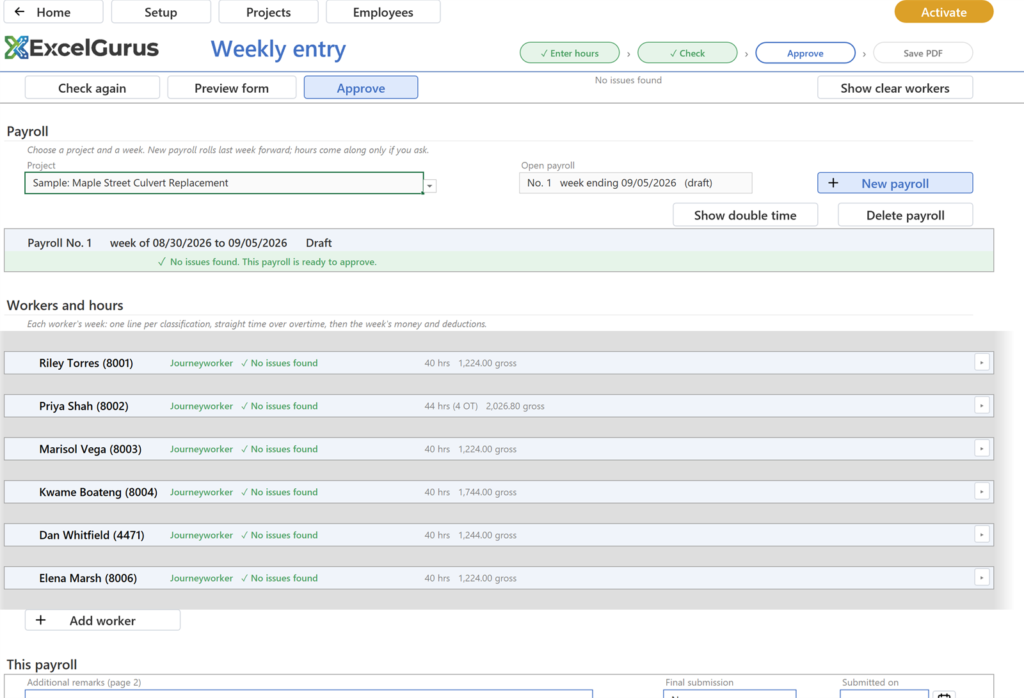
A payroll that passed every check, with Approve lit: the sheet did the comparison before anyone signed. Screen from EG Certified Payroll (WH-347), the Excel workbook that does this.
Where a template goes wrong
Search for a WH-347 Excel template and you find the form as a grid: type a name, type hours, type a rate, type the gross. Nothing checks that the rate meets the determination, that the overtime rate is time and a half of the right base, that the hours match the total, or that the net is the gross less the deductions. The reviewer does those checks on receipt, which is why templates produce rejected payrolls at a steady rate. The Department of Labor’s own online form has the same shape: it takes the overtime rate as an input and prints whatever was typed, and it keeps nothing for the next week (the DOL form or a workbook).
What the sheet must hold
| Data | Why it has to be structured, not typed on the form |
|---|---|
| Company, certifying official, workweek start day | Page 2 and the header repeat them on every payroll; the workweek must not drift |
| Projects with contract number, location, wage determination | Every line is measured against the determination named in the header |
| Classifications with basic rate, fringe, and the date each rate took effect | Determinations are modified; last month’s payroll must reprint at last month’s rate |
| Employees with an identifying number and a status | Column 1E and column 2 come from the record, and the record holds four digits, never the full number |
| Hours by date, per worker, per classification | Column 4 is dated; hours keyed to a column shift when the week ending date changes |
| Deductions with a type and an authorization date | Column 8 and the deductions certification on page 2 depend on what kind of deduction it is and when it was consented to |
What the sheet must derive
- The overtime rate, as one and one-half times the basic rate or the higher actual rate, excluding fringe. Never an input.
- Total hours from the daily cells, straight time and overtime separately.
- Gross for the project from hours times rates plus cash in lieu of fringe; net from gross for all work less the deductions.
- The fringe credit and cash in lieu as hourly amounts times total hours, across every classification the worker had that week.
What the sheet must check before printing
Rate paid plus fringe reaches the determination for the classification. Every worker on the payroll has an identifying number and at least one hour, or is removed. Every apprentice is flagged as one, with a program on the project. Deductions are of a permitted type. On the Statement of Compliance, the apprentice box agrees with column 2, the fringe box with columns 6B and 6C, and the tables under them with both. A sheet that prints without these checks is a template with better formatting.
What the sheet must never do
- Recompute an old payroll. When a rate changes, the payrolls already filed must reprint as filed. Rates belong on the line as it was approved, not looked up live from a master table.
- Hold Social Security numbers. The weekly submission carries four digits. A workbook that holds nine is a data breach waiting for an email attachment.
- Compute withholding. Tax tables are payroll software’s job. The certified payroll reports the deductions the payroll made; it does not decide them.
What the workbook on this site does. EG Certified Payroll is built to the list above: the data lives in hidden tables, every figure on the form is derived, Check runs the rules before approval, approved payrolls are archived as snapshots, and the workbook holds no SSNs and no contact details by design. The trial is the full product with a mark on the printed pages.
Common questions
Can I keep using my own Excel sheet?
Yes, if it does what the table above says. The test is whether a reviewer can find an error in it that you could not, with the same information. If the sheet cannot compare a rate to the determination, you are the check.
Do I still need payroll software?
For withholding, tax deposits and pay stubs, yes. A certified payroll workbook is a reporting layer on top of the payroll you already run; it never computes taxes.
Why not just use the DOL online form?
It is a fillable form. It takes the overtime rate as typed and prints it, stores hours by column position rather than by date, and does not compare anything to a wage determination.
Check it before you sign it
EG Certified Payroll is the workbook described above: derived figures, dated rates, a Check that lists every finding before you approve, and an archive of approved payrolls that reprint exactly as certified. The video near the top of this page shows the four tests on the sample project.
See EG Certified Payroll (WH-347)Free trial, the full product; every printed page carries a TRIAL COPY mark until a license is activated. Excel for Windows or Mac.
More in this series: The Mistakes That Get a Certified Payroll Rejected · How to Fill Out Form WH-347, Column by Column · All certified payroll guides
★★★★★
“Most likely one of the best freelancers I’ve had the opportunity of working with. I would highly recommend David for any complex VBA coding. We’ll be working with him again in the future.”
VBA Development Client · via Upwork, 2020
5.0★ across 230+ client reviews · 100% Job Success on Upwork · Building Excel tools since 2010 · Read the reviews →