
SCA wage determinations: your payroll checked, your 52.222-43 price adjustment prepared
EG SCA Wage Pack (52.222-43) is an Excel workbook for Windows and Mac that prepares and checks the wage and fringe numbers of a Service Contract Act (SCA) contract. You fetch the contract’s wage determination from SAM.gov by its number and import your payroll export, and it checks each employee’s wage, health and welfare, vacation and holiday pay against it. When a new wage determination arrives at an option, it prepares the evidence pack for a FAR 52.222-43 price adjustment from the rates you paid and the hours in your payroll: the tables, a backup workbook and a draft letter. You review, sign and send the request to the contracting officer yourself.
See the free trial and the three tiers
Built by an Excel developer, not a template site.
Hundreds of custom Excel projects · 5.0★ client rating across 230+ reviews · Building Excel tools since 2010
EG SCA Wage Pack is made by ExcelGurus, LLC. ExcelGurus is not affiliated with, endorsed by, or acting for the U.S. Department of Labor, the U.S. General Services Administration, SAM.gov or any contracting agency. Nothing on this page or in the workbook is legal advice.
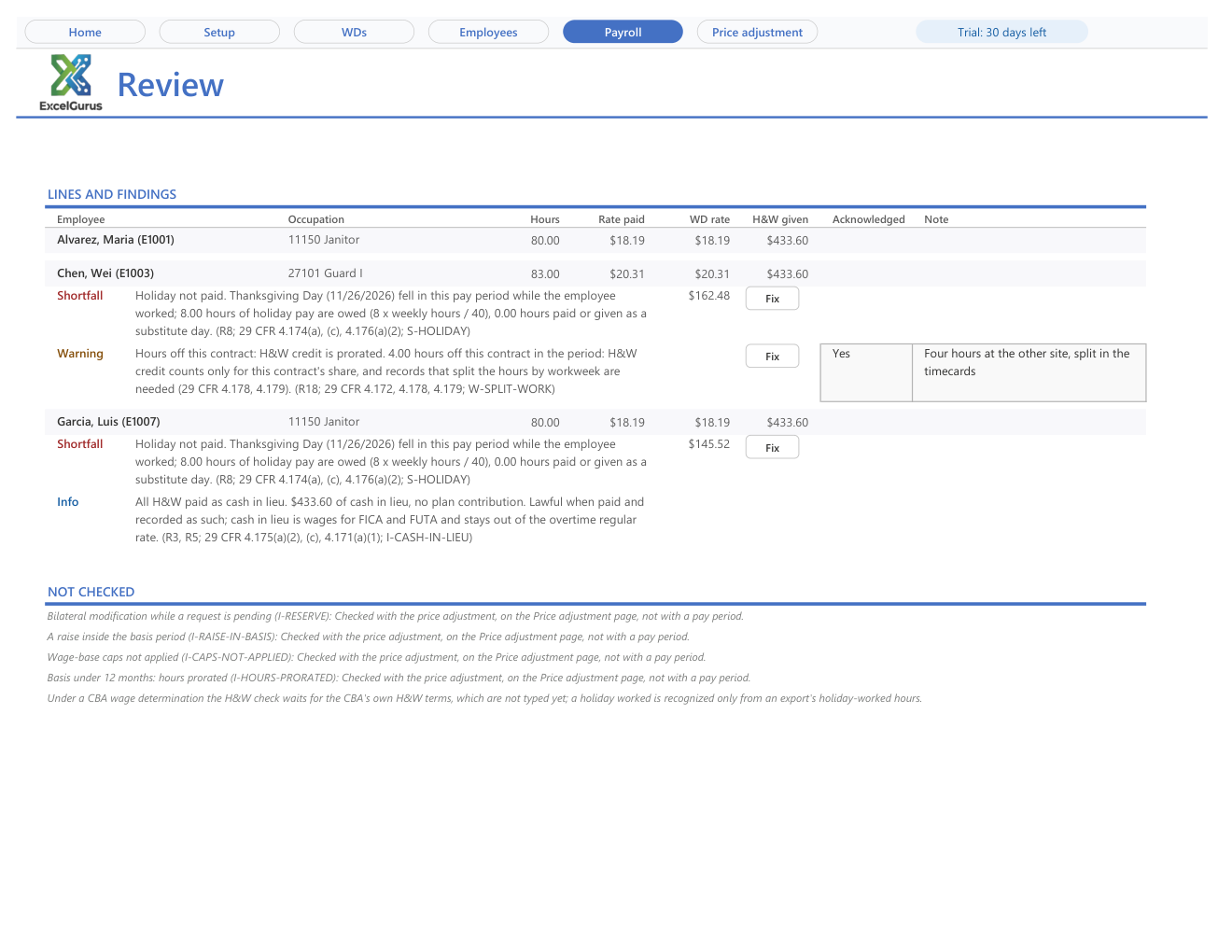
Each finding names the employee, what the wage determination requires, what was paid and the amount short, with the rule it comes from. Sample data.
What EG SCA Wage Pack does
It reads the wage determination and your payroll export, checks every employee against it, and prepares the evidence pack when a new one arrives. You review, sign and send the request.
How it works set up once, then each pay period, then each option ▼
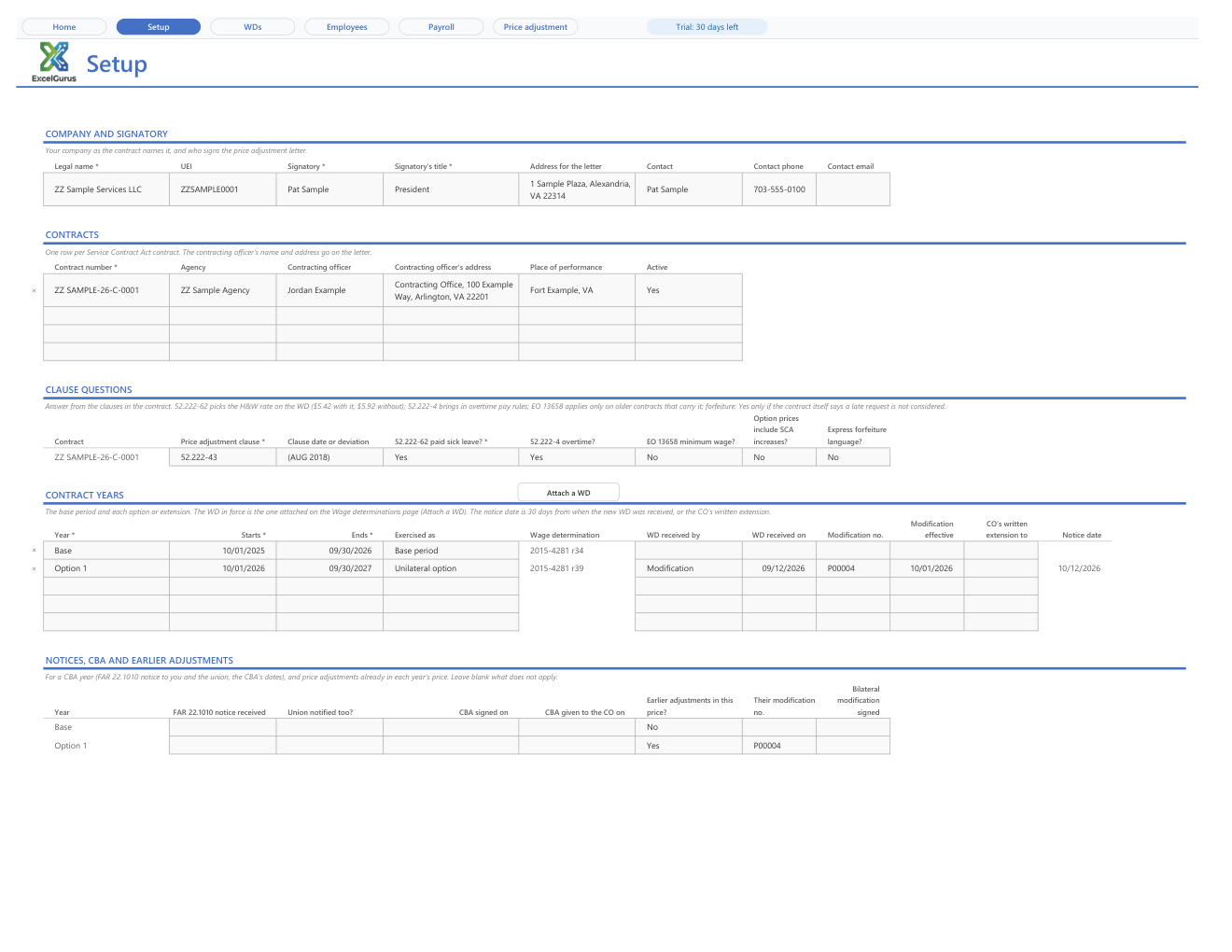
- Setup. Your company and the person who signs; each contract with its contracting officer; its clauses as plain questions (52.222-43 or 52.222-44, paid sick leave under 52.222-62, overtime under 52.222-4, the EO 13658 minimum wage, SCA escalation in option prices); its contract years, CLINs and labor rates; your tax and workers’ comp rates; your health and welfare plans.
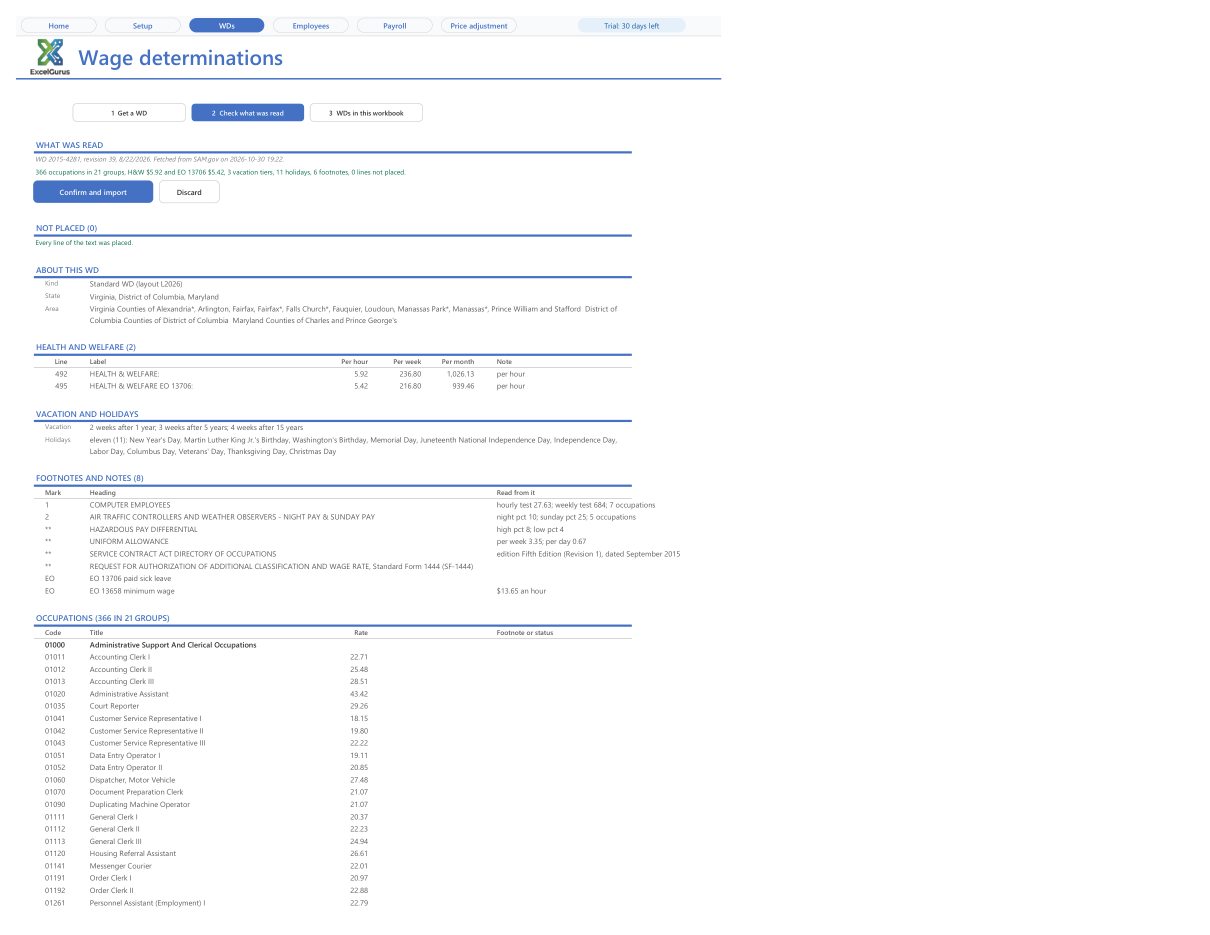
- Wage determinations. Fetch one from SAM.gov by its number and revision, paste it, or open a .txt file saved from SAM.gov. Every occupation and rate, the health and welfare rate, the vacation tiers, the holidays and the footnotes are read, and any line that could not be placed is listed, so you check what was read before you attach it to a contract year. A wage determination built on a collective bargaining agreement opens a grid you fill in instead.
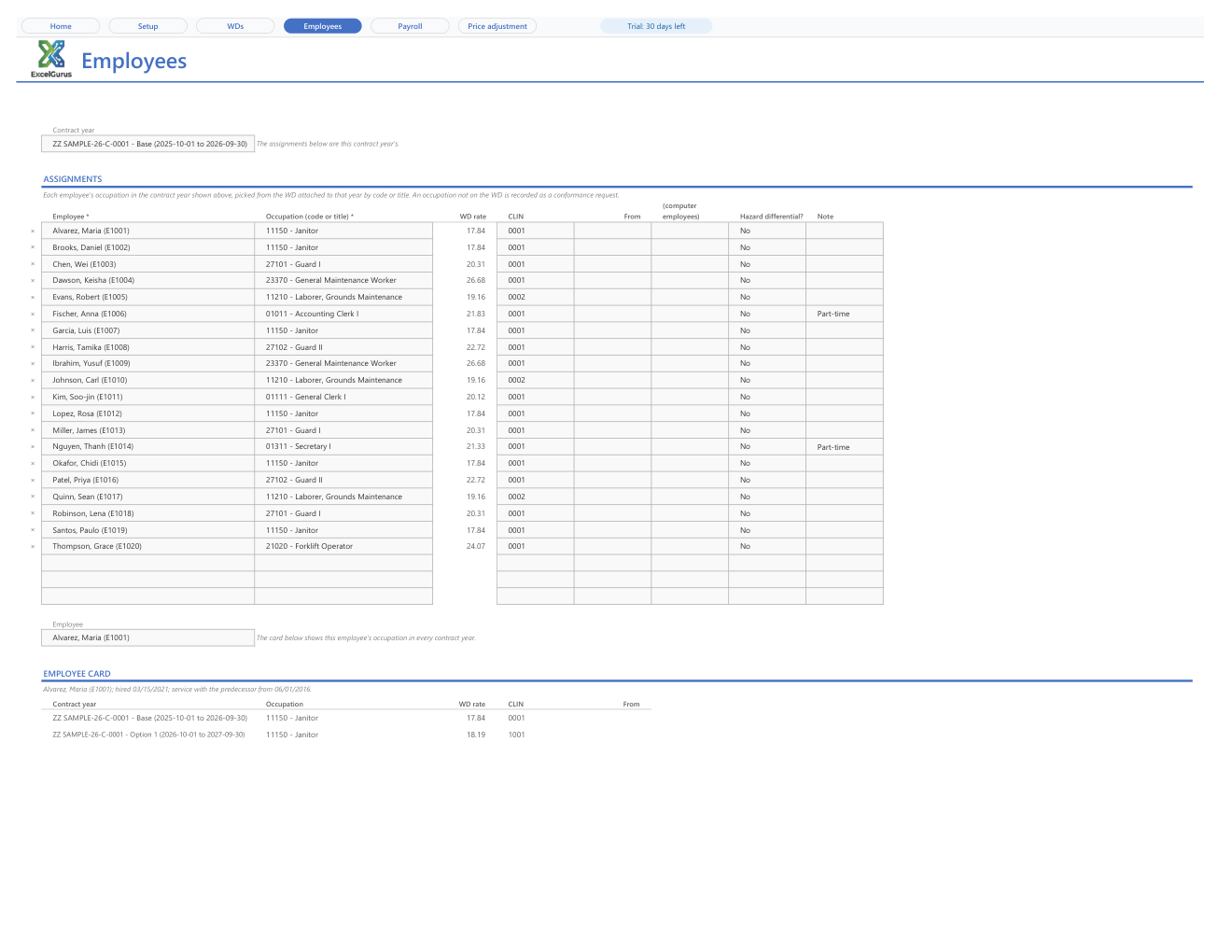
- Employees. Each employee with a hire date and any service with the predecessor contractor, and an occupation in each contract year, picked from the wage determination by code or title. An occupation that is not on it is recorded as a conformance request.
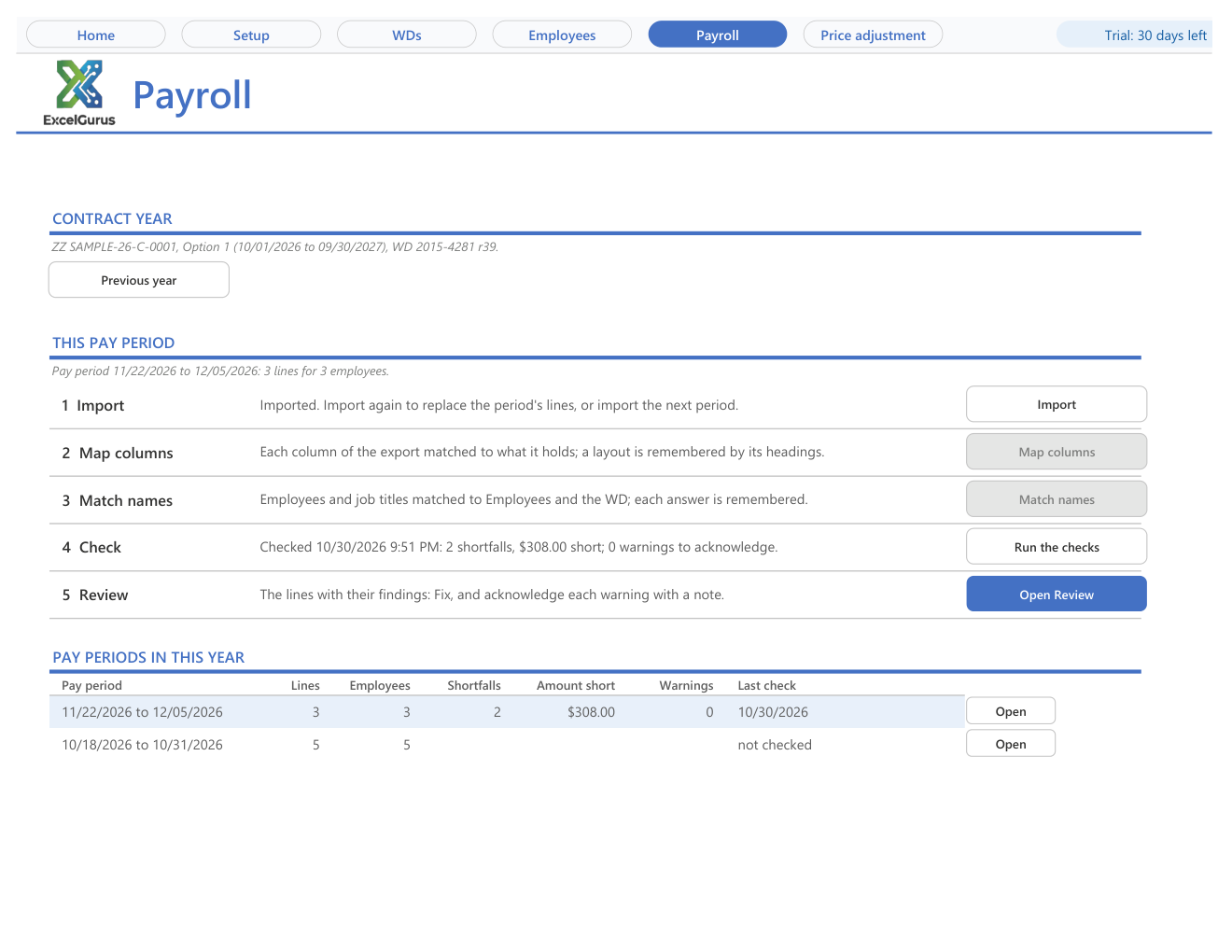
- Payroll. Import each pay period’s payroll export: paste it, or open a CSV or Excel file. The columns are mapped once and remembered by their headings, and an employee or job title it does not know is asked about once and remembered.
- Review. The period’s lines with their findings beneath, a Fix button that opens the record behind a finding, and each warning acknowledged with a note.
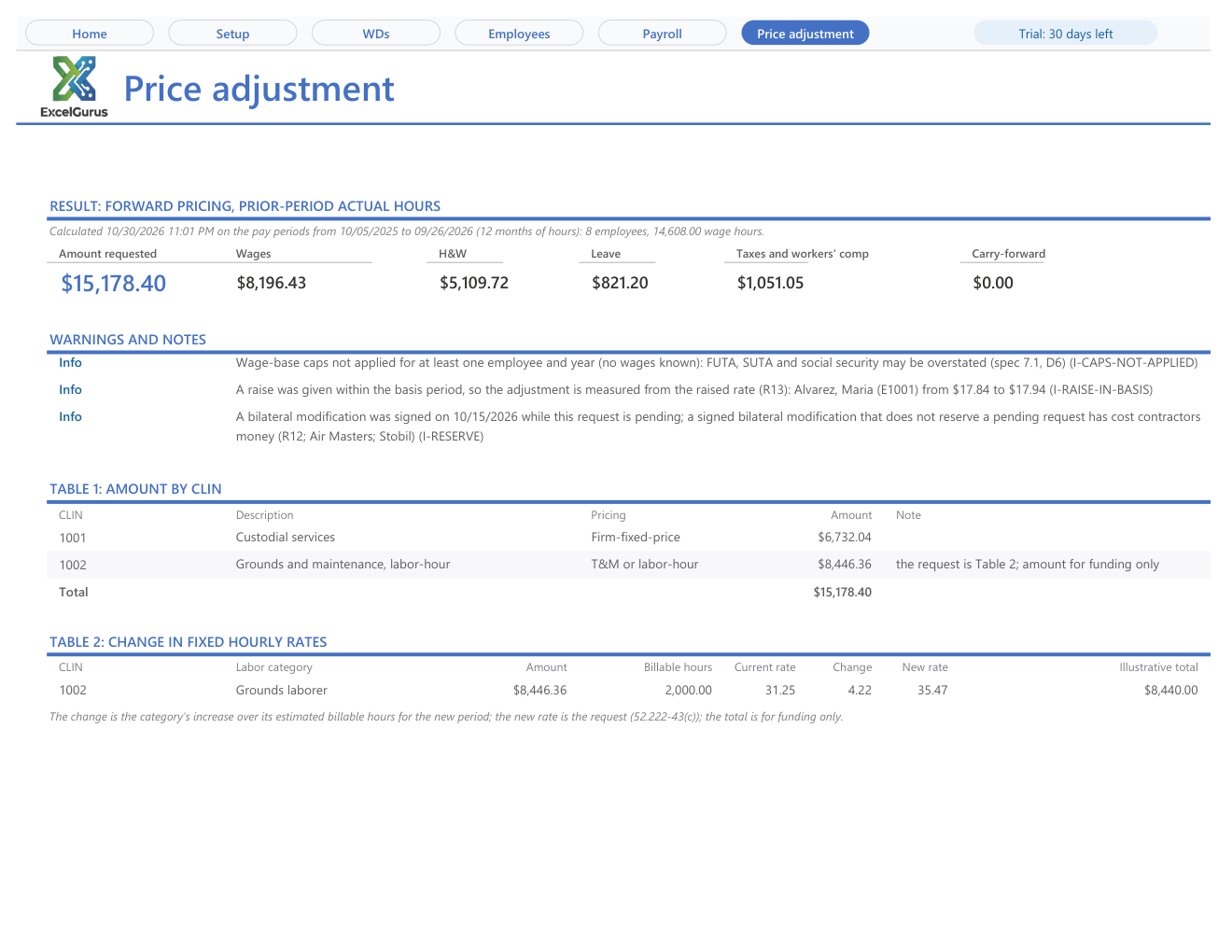
- Price adjustment. When a new wage determination arrives at an option: the old and new rates side by side, the increase per employee and per CLIN, and the evidence pack.
- Archive. Closing a contract year locks it and writes its own archive file, values only, which opens without the workbook.
What it checks every employee, every pay period ▼
- Shortfalls, for example: a rate paid below the wage determination’s rate for the occupation; health and welfare below the rate for the hours that earn it, up to 40 a week, per employee and never averaged; a holiday or vested vacation not given or paid; paid leave below the higher of the wage determination’s rate and the employee’s own rate; two classes in one workweek without the hours split between them.
- Warnings, for example: hours under an occupation that is not on the wage determination, with the date its conformance request is due; a gap that depends on how the period’s hours fall in weeks, when your export has period totals only; overtime below time and a half, when it has weekly hours; health and welfare paid to a plan not marked bona fide; the same line imported twice.
- Every finding names the employee, the pay period, the occupation, what the wage determination requires, what was paid, the amount short and the rule it comes from.
- Wages above the rate do not cover a health and welfare gap, and the finding says so.
The price adjustment and the evidence pack from your rates and your payroll hours ▼
- From what you actually paid. Each employee’s wage increase is measured from the higher of the rate you paid and the old wage determination’s rate, on the hours in your imported payroll, with the employer’s social security, unemployment taxes and workers’ compensation on the increase. No overhead, G&A or profit.
- What is left out is shown, with the reason, for example raises above the new minimum, exempt staff and cost-type CLINs.
- Table 1 gives the amount by CLIN, and Table 2 the change in each fixed hourly rate of a time-and-materials or labor-hour CLIN.
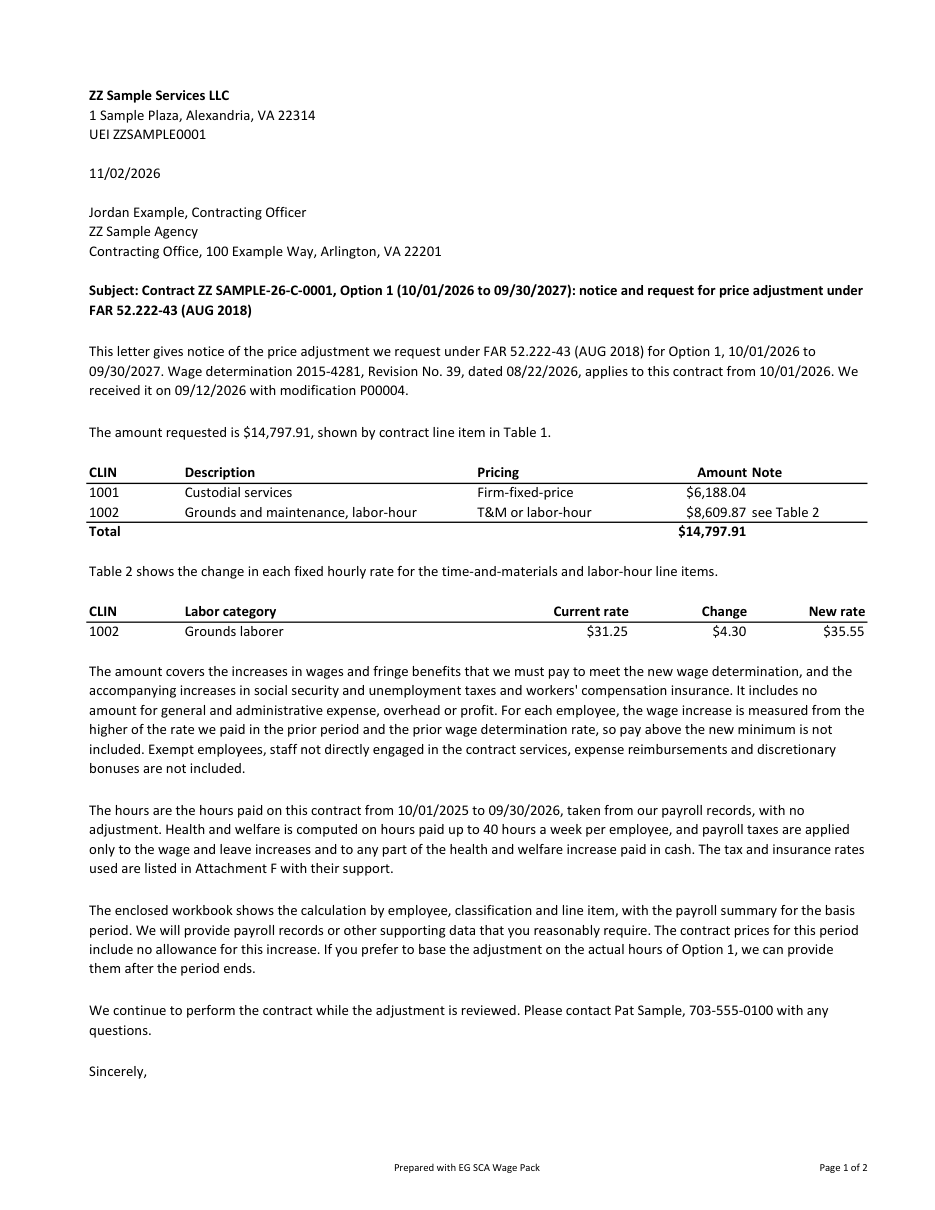
- The evidence pack is a backup workbook (.xlsx, values only) holding the draft letter and attachments A to G: the amount by CLIN, the rate changes, the calculation by employee and classification, the payroll summary, health and welfare support, the rates and assumptions, and both wage determinations as imported. With it comes a PDF of the letter and its tables. Each is a new file, never saved over an existing one.
- The letter is a draft for you to review, edit, sign and send. It makes no legal argument and certifies nothing.
What it deliberately does not do. It never files, sends, submits, signs or certifies anything: you review the request, sign it and send it to the contracting officer yourself. The only outside site it reads is SAM.gov, when you use Fetch WD, and it does not search SAM.gov for your wage determination: you bring the number and revision from your contract. It does not run payroll or compute withholding; it reads what your payroll system already produced. It does not cover Davis-Bacon work or a price decrease, prices no cost-type CLIN, and does not file a conformance request (SF-1444) for you. It is not legal advice.
Who built this workbook
EG SCA Wage Pack comes from the same developer behind hundreds of custom Excel projects. These are reviews of that work.
★★★★★
“Most likely one of the best freelancers I’ve had the opportunity of working with. I would highly recommend David for any complex VBA coding. We’ll be working with him again in the future.”
VBA Development Client · via Upwork, 2020
★★★★★
“David does phenomenal work. We brought him in during the middle of a project and he was able to pick up a significant workload very quickly. His communication and ability to hit deadlines early was great. He was a true pleasure to work with and his work was outstanding.”
Report Creation Client · via Upwork, 2022
Every feature, at the Business tier’s limits, for 30 days from the day you first accept the license agreement. No card needed, and nothing is charged when it ends. A pack made during the trial is marked as prepared with a trial copy at the foot of each page.
When it ends, your copy still opens your data, history and past evidence packs, and still imports and checks payroll, but shows only the number of findings and makes no new evidence pack. Your data stays. A license unlocks the same copy in place.
A signed setup program for Windows. What it installs and how to uninstall it are set out below the tiers, with the license agreement.
On a Mac, the same button gives you the workbook itself, for Excel for Mac (Microsoft 365 or Excel 2024).
Covers
- ✓ Up to 25 SCA employees
- ✓ Up to 2 contracts
- ✓ Every finding, the price adjustment and the evidence pack
Renews automatically every year at $599 until you cancel.
Buy StarterCovers
- ✓ Up to 100 SCA employees
- ✓ Up to 6 contracts
- ✓ Every finding, the price adjustment and the evidence pack
Renews automatically every year at $1,099 until you cancel.
Buy ProfessionalCovers
- ✓ Up to 200 SCA employees
- ✓ Any number of contracts
- ✓ Every finding, the price adjustment and the evidence pack
Renews automatically every year at $1,799 until you cancel.
Buy BusinessEach license renews automatically every year at its tier’s price until you cancel. Cancel online at any time from your license email or from the license box in EG SCA Wage Pack: you are not charged again, and your license stays good through the year you paid for. A renewal charge is refunded in full if you ask within 30 days of it. First purchases and upgrades are final: the 30-day trial gives you every feature before you pay. Request a refund at excel-gurus.com/support. Renewal terms
Both counts must be within your tier: SCA employees and contracts. Over either limit, everything keeps working except making a new evidence pack. Move up a tier at any time from your license’s page: you pay the difference between the two yearly prices for the days left to your renewal date, which stays the same. A lower tier starts at your next renewal.
Above 200 SCA employees? Ask about a custom license.
The key arrives by email once the purchase completes. On Home, in the LICENSE card, click Activate license and enter it: your contracts, wage determinations, employees, payroll and evidence packs stay where they are. Every tier runs in Excel for Windows, or Excel for Mac (Microsoft 365 or Excel 2024), on 2 computers; to move to another computer, deactivate it in the license box and activate on the next one.
What the setup program does
EG SCA Wage Pack is software that runs inside Microsoft Excel, on Windows or Mac, and prepares and checks the wage and fringe numbers of a Service Contract Act contract and the evidence pack for a FAR 52.222-43 price adjustment. It reads the wage determination and your payroll export and checks every employee against it. The trial download is a setup program signed by ExcelGurus LLC that installs it as an Excel workbook (.xlsm).
- Installs the workbook and its icon in Documents\ExcelGurus\EG SCA Wage Pack (52.222-43) (you can choose another folder), Start menu shortcuts, a desktop shortcut you can untick, and its uninstaller and settings in your Windows user profile. When it finishes it opens the workbook, unless you untick that box.
- Excel setting: a box, ticked by default, adds that folder and its subfolders to Excel’s Trusted Locations, so the workbook normally opens with no macro warning. Untick it and Setup leaves Excel as it is.
- No administrator rights. It installs for your Windows user only. Needs Windows 10 or later and Excel for Windows. On a Mac there is no setup: the download is the workbook, which you open in Excel for Mac.
- Internet: Setup itself sends nothing. The workbook shows the license agreement again the first time it opens; once you accept it there, it tells our server that a copy has been opened, then checks in normally once a day when it is opened. These messages carry the product, its version, whether a license is active and anonymous identifiers, including a random installation ID that Setup keeps in your Windows user profile. They never carry anything from your spreadsheets: no employee, wage, contract or count of them. Section 4 of the license agreement adds, in these words: “When you use Fetch WD, the Software asks SAM.gov directly from your computer for the wage determination you name; the request carries only the wage determination number and revision and identifies the Software by name and version, and nothing about it is sent to ExcelGurus. SAM.gov’s own terms and privacy policy apply to that request.” (what is sent)
- Uninstall in Windows Settings > Apps > Installed apps (Apps & features on Windows 10 and early Windows 11): find EG SCA Wage Pack (52.222-43) and choose Uninstall. It removes the Excel setting, the shortcuts and its own settings, and asks whether to delete EG SCA Wage Pack (52.222-43) and your wage and payroll data; No, the default, keeps them.
Setup shows the license agreement before it installs anything. License agreement (EULA) and terms · Privacy Policy
Already using the trial? Keep your file. Buying a license unlocks it in place, nothing to move or re-enter.
Already have a license? Manage it, change its tier or cancel automatic renewal.
Questions before you start? Read the FAR 52.222-43 price adjustment guide, the Service Contract Act guides, the renewal terms, or contact support.
Common questions
Does it send the price adjustment request for me?
No. It prepares and checks the numbers, the evidence pack and a draft letter. You review and edit the letter, sign it, and send the request to the contracting officer yourself. It never files, submits, signs or certifies anything, and it is not legal advice.
Is EG SCA Wage Pack endorsed by the Department of Labor, GSA or SAM.gov?
No. ExcelGurus is not affiliated with, endorsed by, or acting for the U.S. Department of Labor, the U.S. General Services Administration, SAM.gov or any contracting agency. Its checks and calculations follow the clause, the regulations and the published guidance as of its release and may not catch every error; passing them does not mean a contracting officer will accept a request or that your pay meets the law.
What does the 30-day free trial include?
Every feature, at the Business tier’s limits, for 30 days from the day you first accept the license agreement. It takes no card, and nothing is charged when it ends. A pack made during the trial is marked as prepared with a trial copy at the foot of each page. When the trial ends, your copy still opens your data, history and past evidence packs, and still imports and checks payroll, but shows only the number of findings and makes no new evidence pack. Your data stays. A license unlocks the same copy in place.
Which tier do I need?
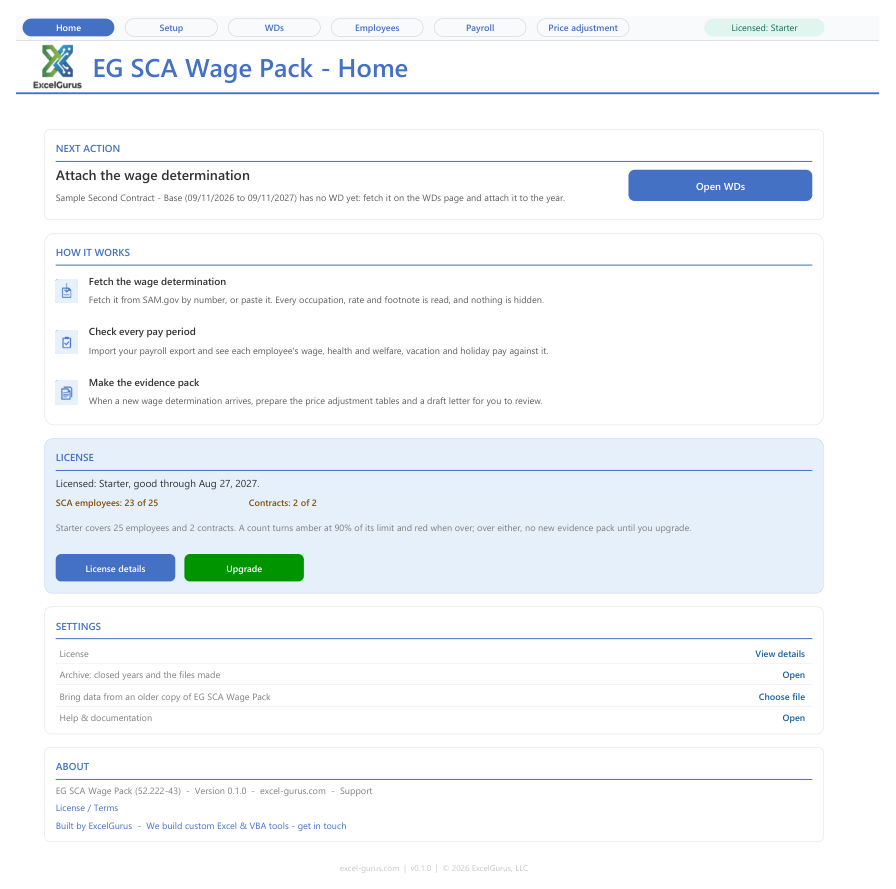
Each tier covers a number of SCA employees and contracts, and both counts must be within it: Starter up to 25 SCA employees and 2 contracts, Professional up to 100 and 6, Business up to 200 and any number of contracts. An employee counts while they hold an occupation in a contract year that is not closed and has not ended, or ended within the last 12 months, unless you marked them exempt there; a contract counts while it has such a year. Closed years in the archive never count. Home shows both counts against your limits all the time, and over a limit everything keeps working except making a new evidence pack. Above 200 SCA employees, ask about a custom license.
Does the license renew automatically? How do I cancel or change tiers?
Yes. A license bought online renews automatically each year, on the renewal date shown in your license email, until you cancel. We email you 35 days and again 20 days before each renewal, with the date, the tier, the amount and how to cancel. Cancel online at any time from the link in your license email or in any renewal email, or with Manage renewal in the license box of EG SCA Wage Pack: you are not charged again, and your license stays good through the date it already has. Move up a tier at any time from your license’s page, paying the difference for the days left; a lower tier starts at your next renewal. A renewal charge is refunded in full if you ask within 30 days of it. First purchases and upgrades are final: the 30-day trial gives you every feature before you pay. Request a refund at excel-gurus.com/support.
Which payroll systems does it read?
Any that exports pay lines to CSV or Excel, or whose report you can paste. You map the columns once, such as employee, job title, hours worked, paid leave hours, rate paid, health and welfare contribution and cash in lieu, and the layout is remembered by its headings. With hours by workweek, the weekly rules are checked exactly; with pay period totals only, a gap that depends on how the hours fall in weeks is shown as a warning that says so.
Does it track the 30-day notice?
It shows the notice date, 30 days from when you received the new wage determination, on Home and on the Price adjustment page. If the date has passed, the letter states the dates and nothing more. Our guide to FAR 52.222-43 explains the notice and what boards have said about it.
Does it run on a Mac?
Yes, in Excel for Mac (Microsoft 365 or Excel 2024). On a Mac the download is the workbook itself rather than the setup program: open it in Excel and click Enable Macros when Excel asks. On a Mac, Excel asks where to save each evidence pack, and the PDF of the letter goes into an SCA price adjustments folder beside the workbook.