
Invoicing in Excel with a Customer and Product Database
Every invoice you send contains information you already had. The customer’s name, address, and email: you typed those last month. The labor rate: same one as always. The description of the service: word for word what it said last time. Invoicing from a template means re-entering your own knowledge over and over, and the fix is the oldest idea in software: enter it once, in one place, and reference it everywhere.
The two databases an invoicing workbook needs
Customers
A client list with company, contact, billing and shipping addresses, phone, email, terms, and notes. On a new document, you pick the client from a dropdown and everything fills in:
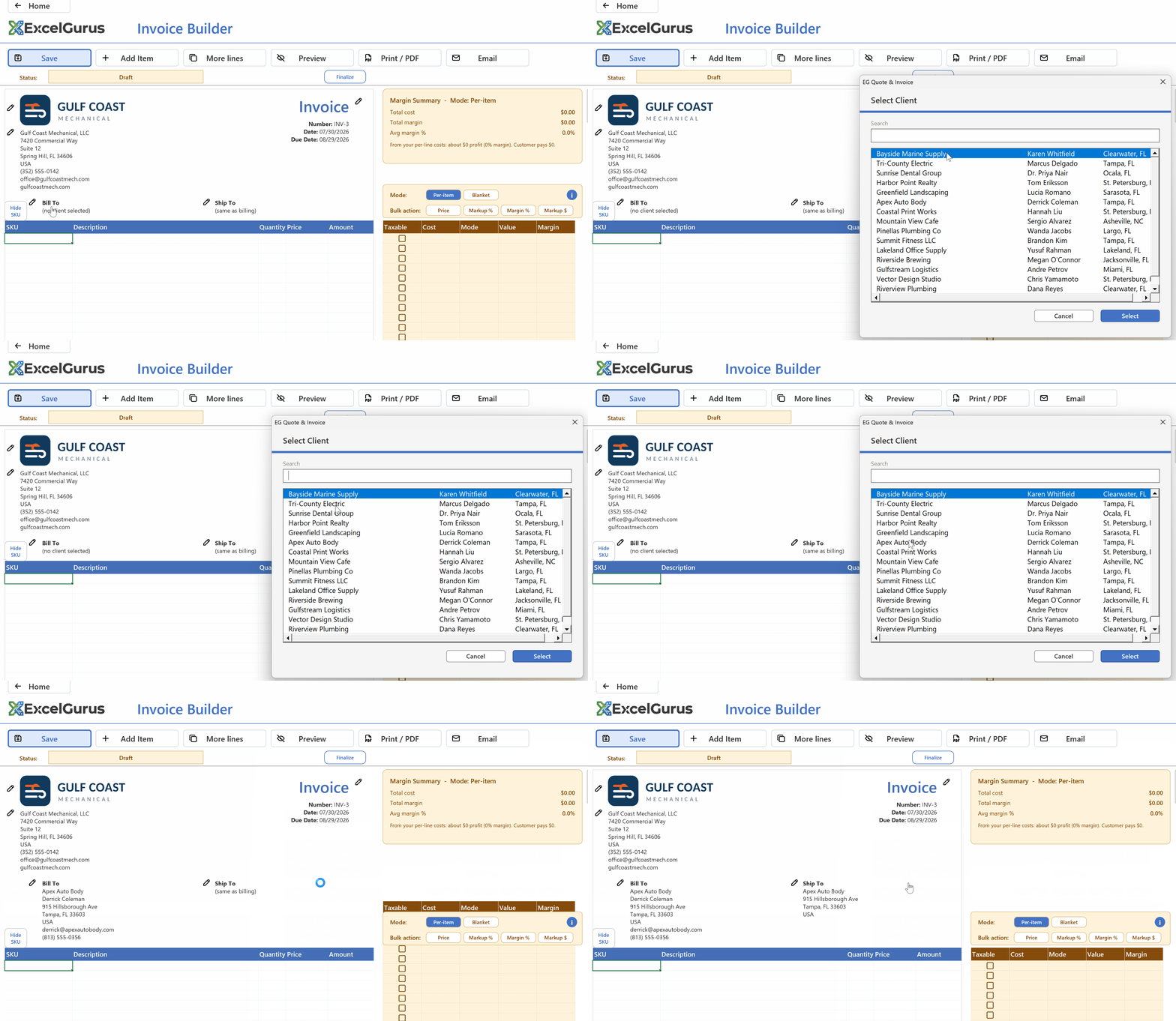
Pick a saved client: name, address, and contact details land on the document. Typed once, ever.
The quiet benefit is not the seconds saved. It is that the address is right. The version of a customer record that gets retyped forty times accumulates forty chances at a transposed digit or a stale suite number, and an invoice mailed to an old address is a payment delayed by weeks. One record, referenced everywhere, corrected once when something changes.
Products and services
The second database is your price list: every service, labor rate, part, and fee you bill, each with a description, a price, and (this is the part templates never have) a cost. Adding a line to a quote means picking from the catalog; description, price, and amount land together, consistent with every other time you have billed that item.
Consistency is a pricing policy. When the same service is priced from memory, it drifts: a little lower when you want the job, a little different every time. A catalog makes your price the price. The customer who calls back gets the same number, and the number is one you decided on deliberately rather than recalled approximately.
Cost next to price means you can see margin. Because each catalog item carries what it costs you alongside what you charge, every line on every document shows its margin, visible to you, never printed for the customer. A price list without costs tells you what you charge; it cannot tell you what you earn.
One update, everywhere. When a supplier raises a price or you raise a rate, you change the catalog entry once. Every future document uses the new number. There is no hunting through old files wondering which version of the price a template has baked in.
Getting your existing data in
Nobody wants to retype two hundred customers into anything, and you do not have to. Both catalogs have a download-template / import path: export what you have from wherever it lives (a spreadsheet, an old system, an accounting export), arrange it in the provided template, and import clients and products in bulk. From then on the catalogs are maintained inside the workbook: add, edit, or archive entries as the business changes. Archiving matters more than it sounds: a discontinued service or a former client disappears from the dropdowns without deleting the history of documents that reference them.
Where this stops being about typing
The catalogs start as a convenience and quietly become the business record. Because every document draws from the same client list, “everything we have billed Harborlight this year” is a filter, not an archaeology project. Because every line references a catalog item with a cost, “which services actually earn” is a question with an answer. The database is not a feature bolted onto invoicing. It is the reason the invoicing can tell you anything.
All of it lives in the one workbook file on your computer: the clients, the catalog, and every document. Desktop Excel on Windows (32-bit or 64-bit) or on a Mac. Nothing syncs anywhere, and backing up the business means backing up one file.
Both databases are in the free edition
Unlimited clients, unlimited catalog items, bulk import, and unlimited documents: free, no account, no expiry. The sample data loads a working client list and catalog so you can see the fill-in behavior before entering your own.
See EG Quote & InvoiceFree edition · Excel for Windows or Mac
More on invoicing in Excel: all guides · the free quote & invoice software · tracking payments and overdue invoices · offline and subscription-free