
Free Quote & Invoice Software for Excel
EG Quote & Invoice is free quote and invoice software that runs inside Excel on Windows and Mac: a working application, not a template. Your clients and a parts and services catalog are saved once, each line is taxable or not, a won quote becomes an invoice in one click, and payments are tracked. The free edition has no document limits, no limit on clients or catalog items, and no expiry. Pro, $79 one-time, removes the PDF footer and adds the Tax Pack export and overdue reminders.
Search for free invoicing in Excel and you get two kinds of results. Templates: formatted sheets you fill in by hand and rebuild for every job. And web apps: free until the trial ends, the invoice limit hits, or the features you actually need turn out to be on the paid tier. This page is about the third option: a real invoicing application that runs inside Excel, on your own computer, free without a catch worth hiding.
The difference between a template and software
A template is a picture of an invoice. Software is a system that produces them. The distinction sounds academic until you send your thirtieth invoice, and then it is the whole game.
A template has no memory. Every document starts blank. The customer you invoiced last week gets their name and address typed again. The labor rate you always charge gets typed again. The template does not know these things repeat, because a template does not know anything.
A template cannot follow the work. A quote that gets accepted has to become an invoice, and with a template that means building the same document twice and hoping the numbers match. When a payment arrives, nothing records it: the file still says the same total it said the day you sent it.
A template cannot add anything up. Ninety invoices in ninety files means no answer to the questions that matter: what is outstanding right now, who is overdue, what did last quarter look like. The information exists. It is just unreachable.
What the software version looks like
EG Quote & Invoice is a macro-enabled Excel workbook that behaves like an application. One file holds your clients, your priced products and services, and every document you have ever created. And the pieces are connected.
The clearest example is the moment a quote gets accepted:
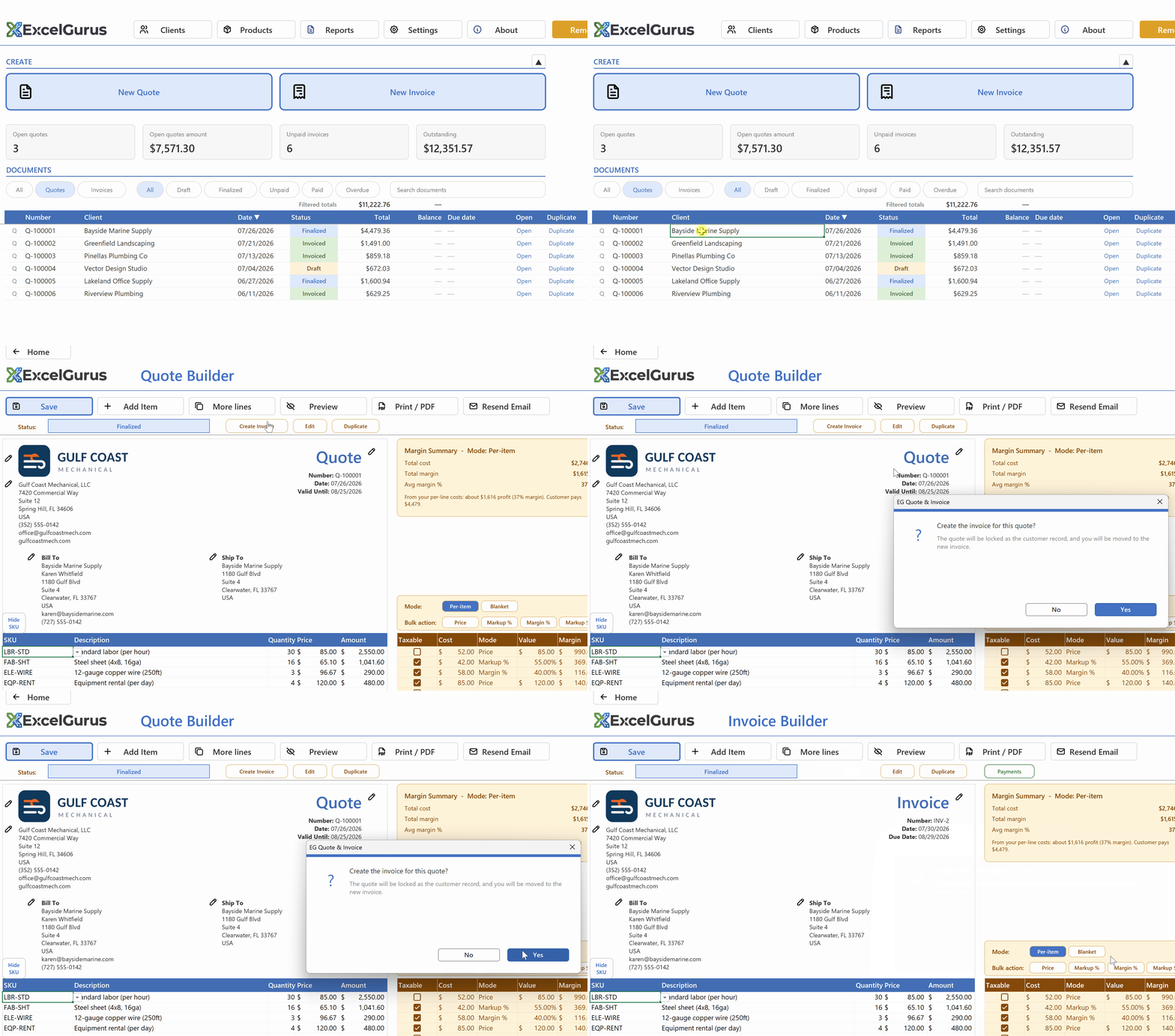
One click turns the won quote into an invoice. The quote is locked as the customer record; nothing is retyped.
The same connectedness runs through everything else. Pick a client and their details fill in. Pick a catalog item and the price, cost, and margin land with it. Record a payment and the invoice status, the balance, and the dashboard totals all move together. The document you print or email looks like any professional invoice. The system behind it is what changed.
What “free” actually includes
The free edition is the full application, and the limits are none of the usual ones:
- Unlimited documents. No cap on quotes or invoices, ever. Not a trial, does not expire.
- The whole feature set for running jobs. Client and product catalogs, quote-to-invoice conversion, payments and balances, overdue tracking, PDF and email delivery, the reports dashboard, and cost and profit on every line.
- No account, no signup. Download the file, open it in Excel, start. Your data never leaves your machine.
The honest catch, stated plainly: free-edition documents carry a small “Created with EG Quote & Invoice” line at the bottom. Fine for many businesses; less ideal if you want only your own branding in front of customers. The one-time $79 Pro upgrade removes it and adds a year-end tax export and one-click overdue reminders. That is the entire business model, no subscription anywhere in it.
What you need to run it
Desktop Excel: on Windows, 32-bit or 64-bit; on a Mac, Excel for Mac (Microsoft 365 or Excel 2024). It is a macro-enabled workbook (.xlsm), so Excel will show its standard security prompt on first open (normal for any downloaded macro file), and there is a one-minute guide to enabling it. It does not run on Excel Online.
Who this fits
It was built for trades and contractors: the people quoting jobs, converting wins into invoices, and chasing payment on thirty-day terms. There are guides to how specific trades bill, from HVAC to cleaning services, in the invoice guides by trade. But nothing in it is trade-specific: any small business that quotes work and invoices for it runs the same loop.
Try it: the download is the free edition
No card, no account, no time limit. Open it, load the sample data to click around a working system, then clear it and enter your own.
See EG Quote & InvoiceFree edition · Excel for Windows or Mac
More on invoicing in Excel: all guides · tracking payments and overdue invoices · customer and product databases · offline and subscription-free