
Send professional quotes and invoices from Excel
EG Quote & Invoice is free quoting and invoicing software that runs inside Excel on Windows and Mac, built for trades and contractors. It keeps your clients and a parts and services catalog, taxes each line on its own so parts can be taxed and labor not, shows live profit margins, tracks payments and overdue invoices, and sends quotes and invoices by PDF or email. Everything stays in your own file, and Pro is a $79 one-time upgrade of the same file.
What the setup program does
EG Quote & Invoice is quoting and invoicing software that runs inside Microsoft Excel, on Windows or Mac. The free download is a setup program signed by ExcelGurus LLC that installs it as an Excel workbook (.xlsm).
- Installs the workbook and its icon in Documents\ExcelGurus\EG Quote & Invoice (you can choose another folder), Start menu shortcuts, a desktop shortcut you can untick, and its uninstaller and settings in your Windows user profile. When it finishes it opens the workbook, unless you untick that box.
- Excel setting: a box, ticked by default, adds that folder and its subfolders to Excel’s Trusted Locations, so the workbook normally opens with no macro warning. Untick it and Setup leaves Excel as it is.
- No administrator rights. It installs for your Windows user only. Needs Windows 10 or later and Excel for Windows. On a Mac there is no setup: download the workbook and open it in Excel for Mac.
- Internet: Setup itself sends nothing. The workbook shows the license agreement again the first time it opens; once you accept it there, it tells our server that a copy has been opened, then checks in normally once a day when it is opened. These messages carry the product, its version, whether a license is active and anonymous identifiers, including a random installation ID that Setup keeps in your Windows user profile. They never carry anything from your spreadsheets (what is sent, and what a paid license adds).
- Uninstall in Windows Settings > Apps > Installed apps (Apps & features on Windows 10 and early Windows 11): find EG Quote & Invoice and choose Uninstall. It removes the Excel setting, the shortcuts and its own settings, and asks whether to delete the folder; No, the default, keeps your files.
Setup shows the license agreement before it installs anything. License agreement (EULA) and terms · Privacy Policy · Full uninstall steps
Built by an Excel developer, not a template site.
Hundreds of custom Excel projects · 5.0★ client rating across 230+ reviews · Building Excel tools since 2010
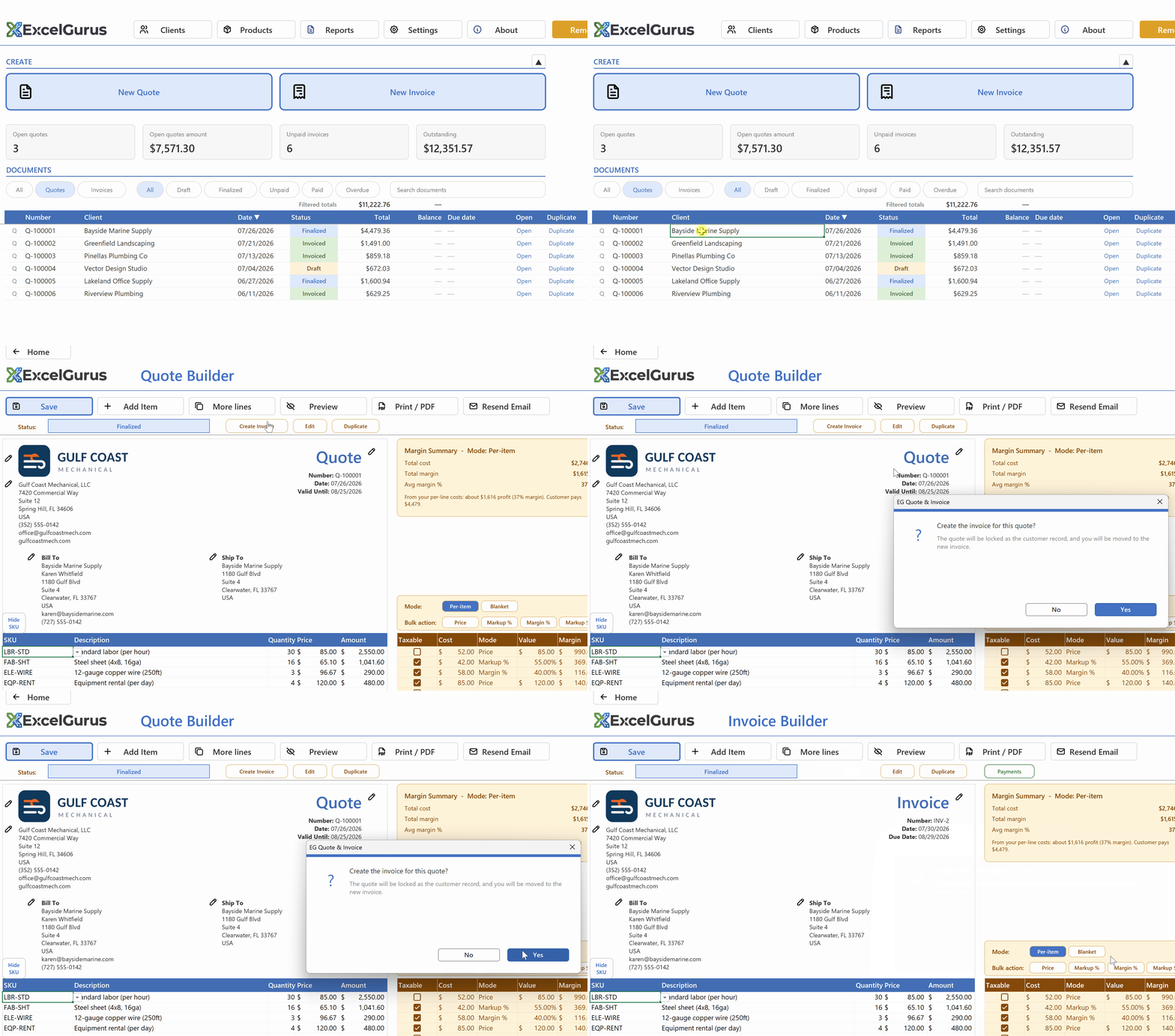
One click turns a won quote into an invoice. No retyping, no copy-paste: the quote is locked as the customer record.
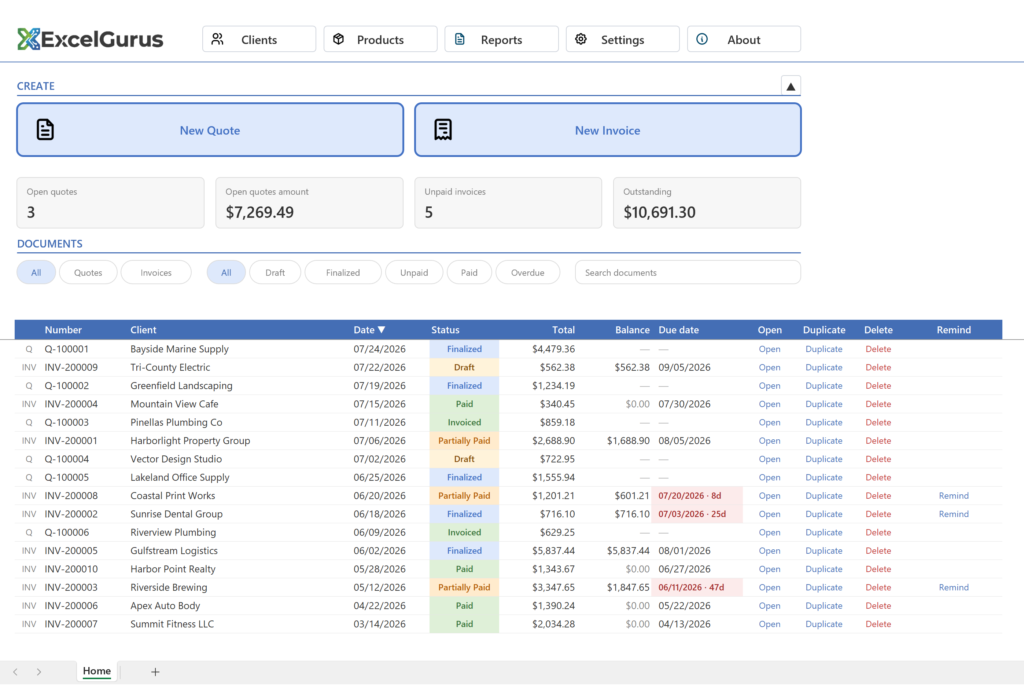
The full tour, 2:35. The whole business on one page: every quote and invoice, its status and its balance.
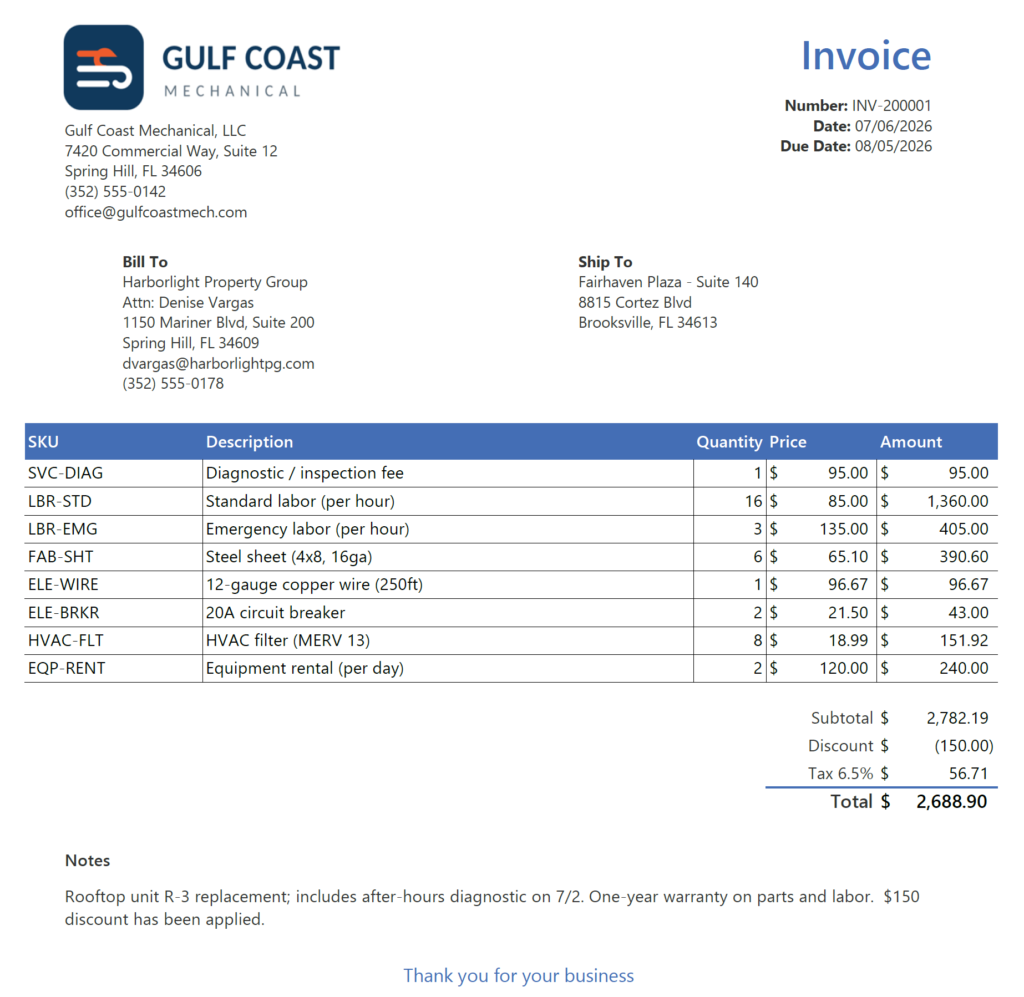
What EG Quote & Invoice does
Built for trades and contractors who already work in Excel: quote a job, turn it into an invoice, and keep track of what has been paid.
Quotes and invoices your logo, line items, tax, terms ▼
- Line items: pull products and services from your catalog, or type a one-off line.
- Numbering: quotes and invoices number themselves in your own format.
- Dates: a valid-until date on quotes, a due date on invoices.
- Notes and closing line: add job notes and a thank-you message per document.
- Duplicate: start a new document from an existing one in one click.
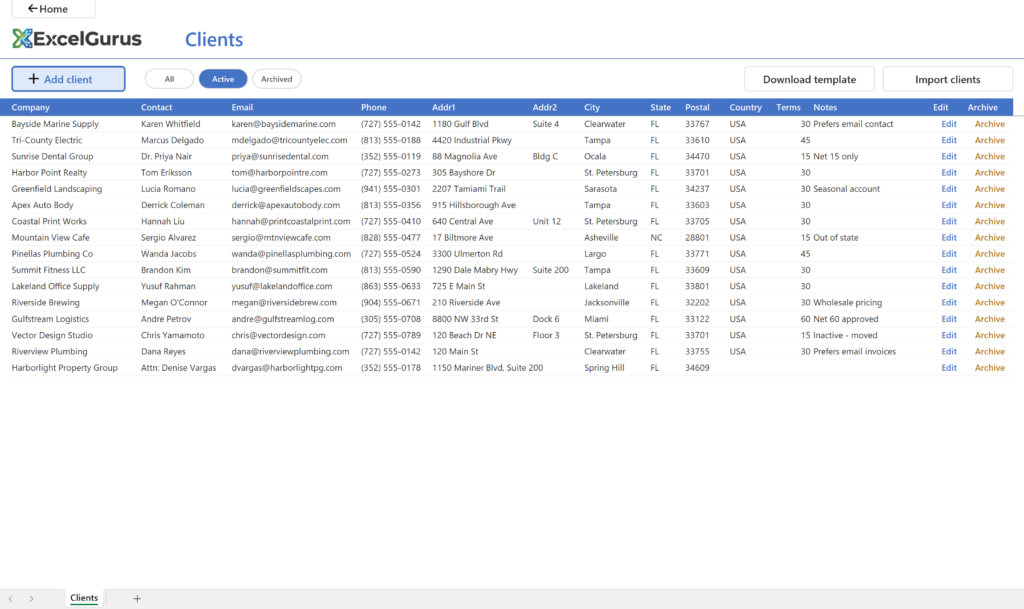
Client and product catalogs enter once, reuse everywhere ▼
- Clients: pick a client and their name, address, and email fill in automatically.
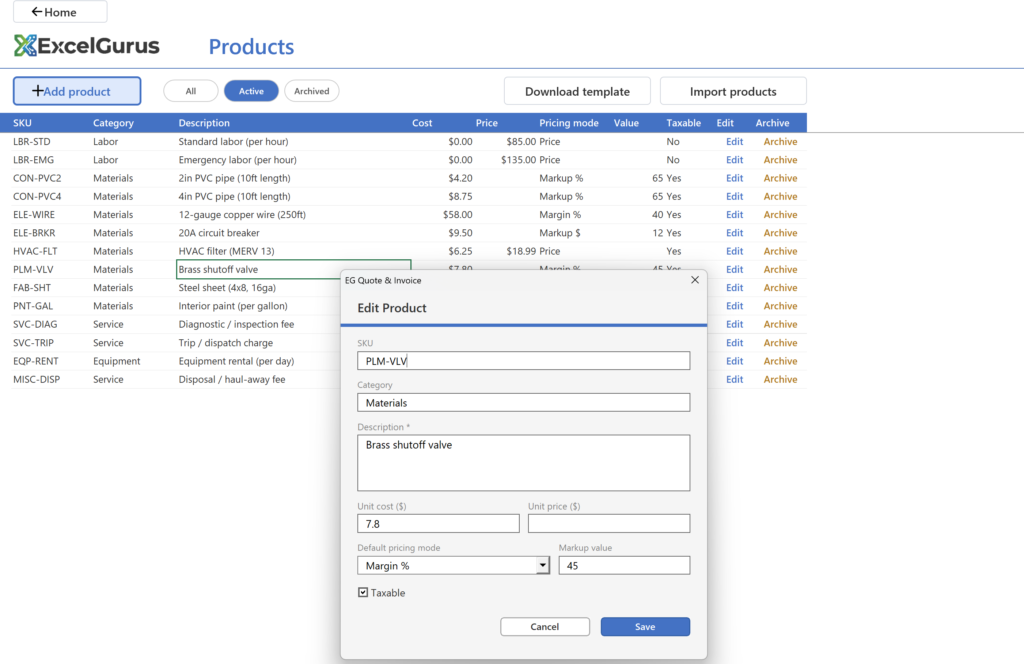
- Products and services: store your descriptions, prices, and costs and add them to any document.
- Editable any time: update a price once and use it on the next quote.
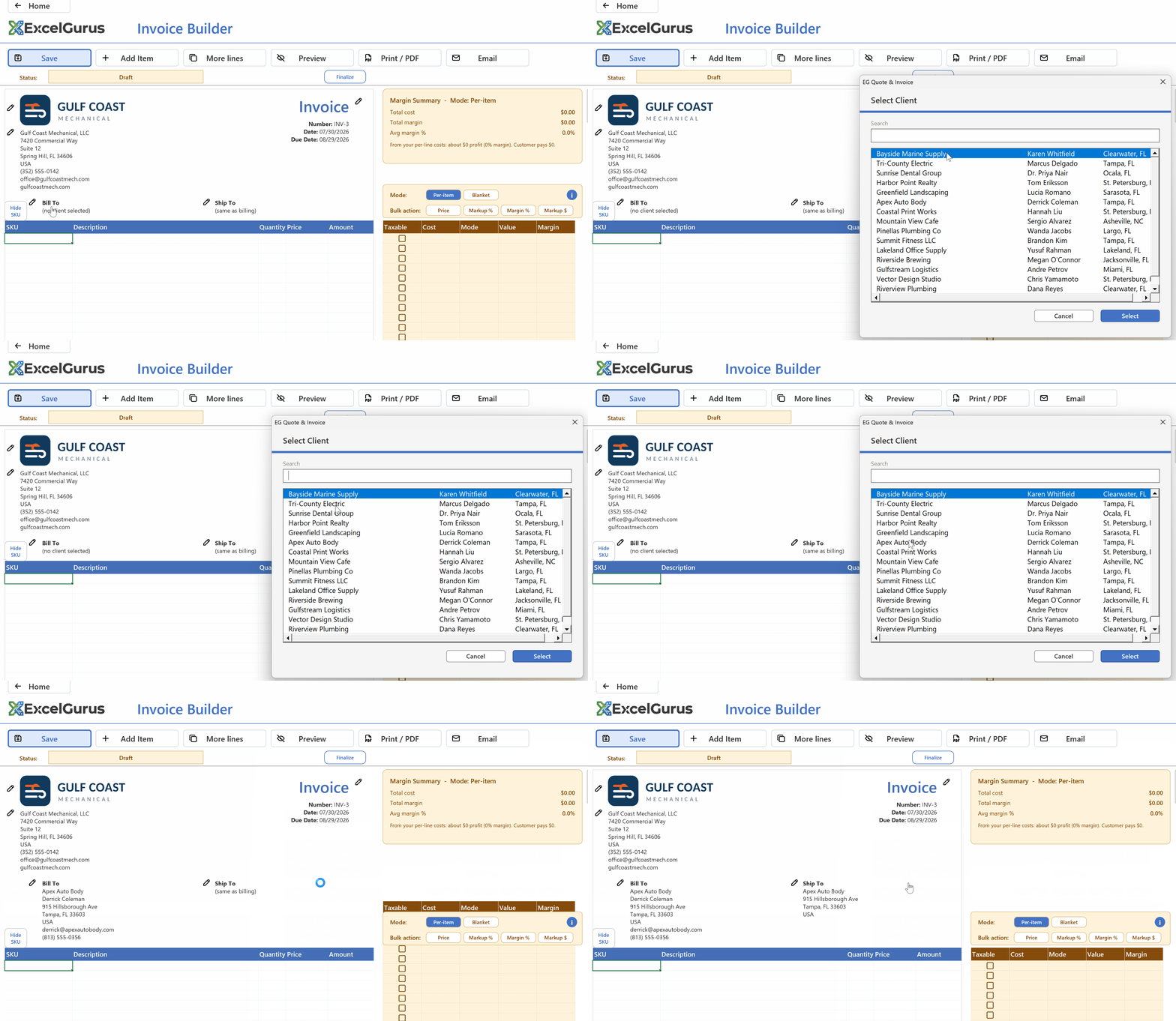
Pick a saved client: name, address, and contact details fill in on their own.
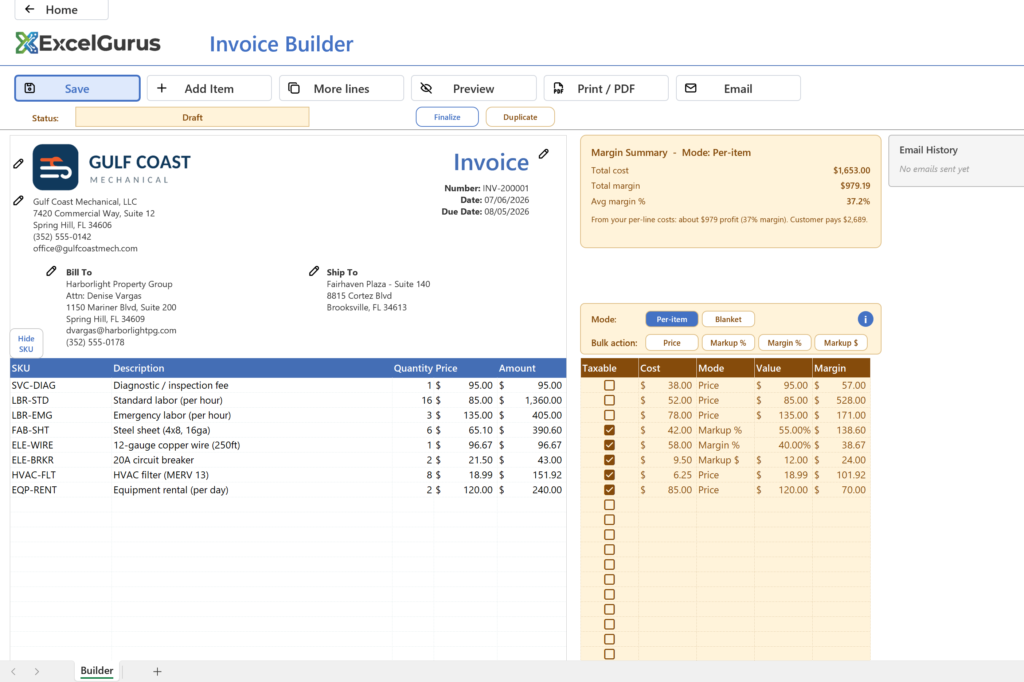
Profit and margin on every job included free ▼
- Per line: margin on each product or service you add.
- Per document: total cost, total profit, and margin for the whole job.
- Customer never sees it: cost and margin stay out of the printed document.
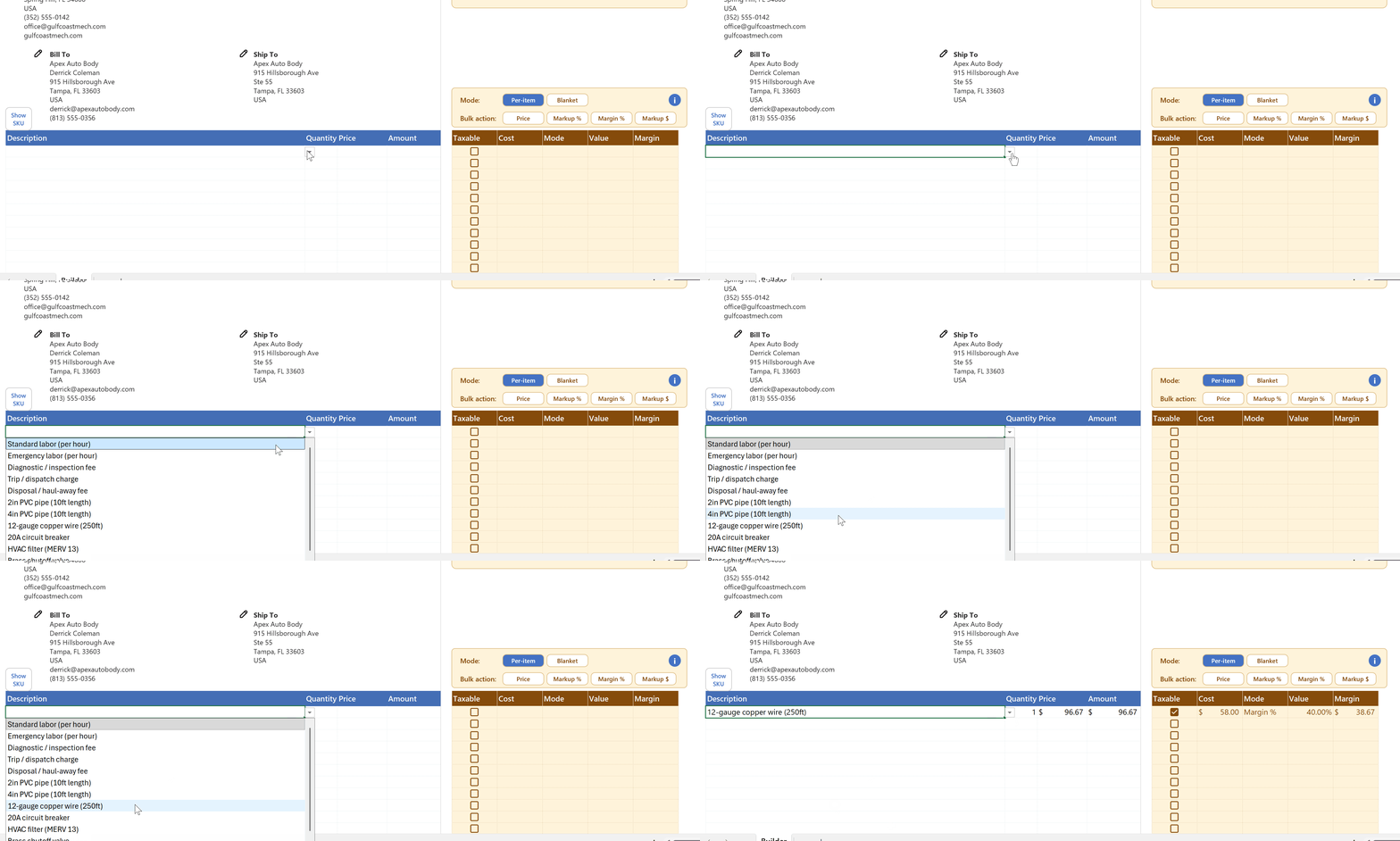
Add a catalog item: price lands on the quote, margin shows on your side only.
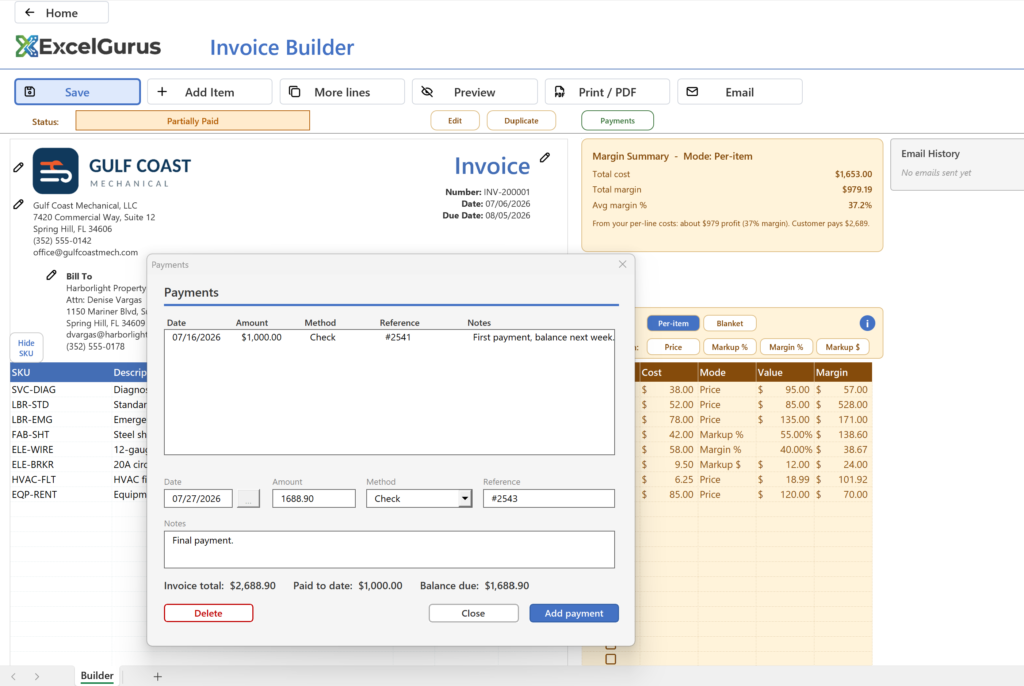
Payments, balances, and overdue invoices know what you are owed ▼
- Full or partial payments: log a deposit now and the balance later.
- Status follows the money: documents move from draft to finalized to partially paid to paid on their own.
- Overdue at a glance: past-due invoices show the due date and how many days late.
- Outstanding total: see everything you are still owed on one screen.
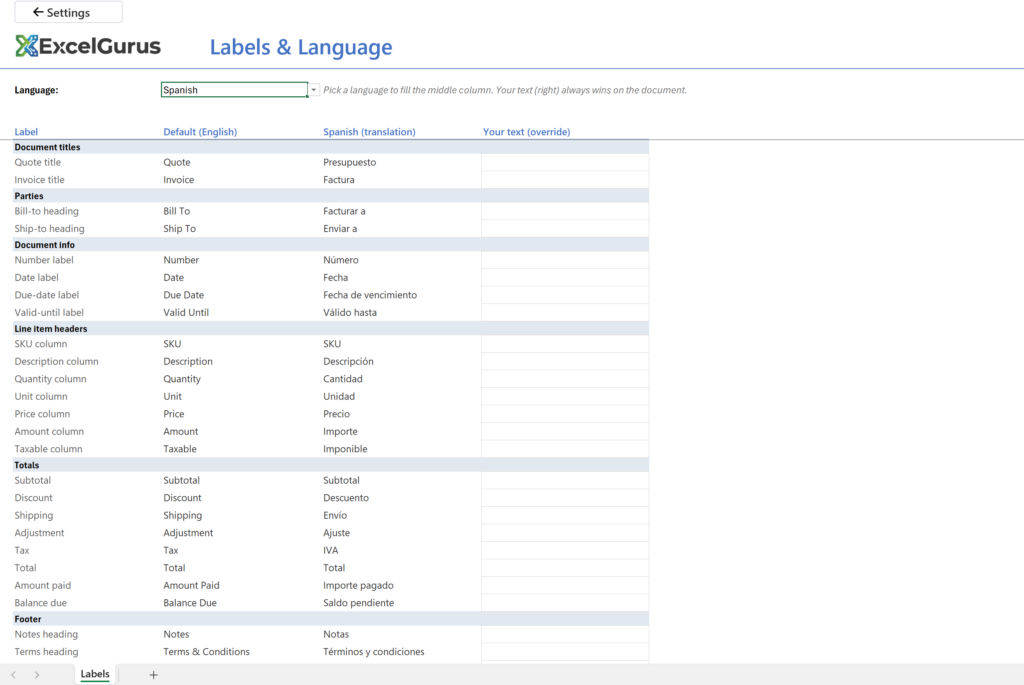
Any language, currency, and date format works outside the US and UK ▼
- Six built-in languages: English, Spanish, French, German, Italian, and Polish. Pick one and every label on the document (Quote, Invoice, Bill To, Due Date, Subtotal, Tax, Total) fills in for you.
- Or your own wording: type your own text for any label and it always wins on the document. Use it to fine-tune a translation, match the wording your trade uses, or set up a language that is not on the list.
- Any currency: enter the symbol you invoice in and choose whether it sits before or after the amount.
- Your date format: yyyy/mm/dd, mm/dd/yyyy, dd/mm/yyyy, yyyy-mm-dd, or written out as Mar 15 2026.
Total: $1,250.00 (prefix) 1,250.00 € (suffix)
Due: 03/15/2026 · 15/03/2026 · 2026-03-15 · Mar 15 2026
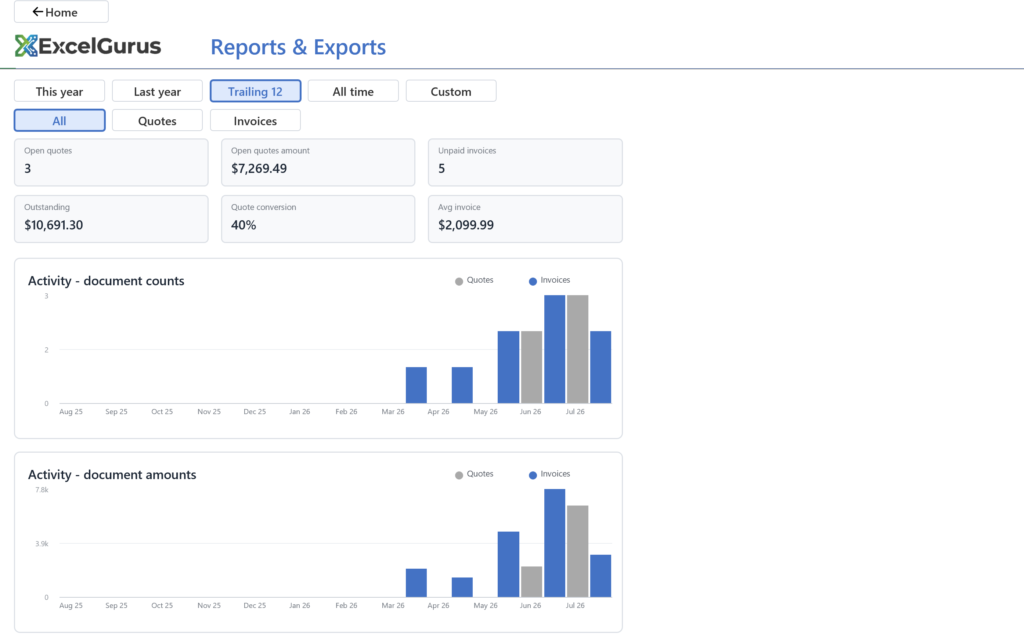
Dashboard and reports open quotes, unpaid invoices, revenue ▼
- At a glance: open quotes and their value, unpaid invoices, and total outstanding.
- Filter and search: narrow to quotes or invoices, to draft, unpaid, paid, or overdue, or search by client.
- Filtered totals: the total and balance of whatever you are looking at.
- Reports: revenue and tax over time, on their own page.
Working in a specific trade? See a worked invoice example for HVAC, electrical, plumbing, roofing, flooring, and six more trades.
Or read more about invoicing in Excel: free quote and invoice software, payment status tracking, customer and product databases, and working offline without a subscription.
Who built this workbook
EG Quote & Invoice comes from the same developer behind hundreds of custom Excel projects. These are reviews of that work.
The same client, ten years apart, on a custom Excel quoting tool David built in 2011.
2011
★★★★★
“I contacted David to build a Quote Generator using Ms Excel. I have found David to be Great, Very quick to grasp exactly what my requirements were, extremely helpful and good at what he does. Everything was delivered exactly as agreed on time and on budget and not to mention David made some great suggestions which I had not thought off. Highly recommended”
Tommy W. · via PeoplePerHour, 2011
2021, ten years later
★★★★★
“I used David over 10 years ago to build some bespoke Excel software which is still going strong and used daily within a thriving business. 10 years later and it was time for some updates… David was brilliant, understood the project completely and made some great suggestions. David is everything you’d want in a freelancer… clear and quick communication… excellent time management.. skilled and well priced for what you get in return and trustworthy. Highly recommended”
Tommy W. · via PeoplePerHour, 2021
★★★★★
“Most likely one of the best freelancers I’ve had the opportunity of working with. I would highly recommend David for any complex VBA coding. We’ll be working with him again in the future.”
VBA Development Client · via Upwork, 2020
★★★★★
“David does phenomenal work. We brought him in during the middle of a project and he was able to pick up a significant workload very quickly. His communication and ability to hit deadlines early was great. He was a true pleasure to work with and his work was outstanding.”
Report Creation Client · via Upwork, 2022
Includes
- ✓ Unlimited quotes and invoices
- ✓ Client and product catalogs
- ✓ Profit and margin on every job
- ✓ Payment, balance, and overdue tracking
- ✓ PDF and email delivery
- ✓ Dashboard and reports
Documents carry a small “Powered by ExcelGurus” line at the bottom.
Download freeA signed setup program for Windows. What it installs and how to uninstall it are set out under the plans, with the license agreement.
On a Mac, the same button gives you the workbook itself, for Excel for Mac (Microsoft 365 or Excel 2024).
Adds
- ✓Your branding onlyRemoves the ExcelGurus line from every quote and invoice.
- ✓Year-end tax packExport documents, line items, and payments for any date range, with totals by month for your accountant.
- ✓Overdue remindersDraft a payment reminder for any late invoice in one click.
Same workbook. Your existing file unlocks as soon as you enter the key.
Buy $79What the setup program does
EG Quote & Invoice is quoting and invoicing software that runs inside Microsoft Excel, on Windows or Mac. The free download is a setup program signed by ExcelGurus LLC that installs it as an Excel workbook (.xlsm).
- Installs the workbook and its icon in Documents\ExcelGurus\EG Quote & Invoice (you can choose another folder), Start menu shortcuts, a desktop shortcut you can untick, and its uninstaller and settings in your Windows user profile. When it finishes it opens the workbook, unless you untick that box.
- Excel setting: a box, ticked by default, adds that folder and its subfolders to Excel’s Trusted Locations, so the workbook normally opens with no macro warning. Untick it and Setup leaves Excel as it is.
- No administrator rights. It installs for your Windows user only. Needs Windows 10 or later and Excel for Windows. On a Mac there is no setup: download the workbook and open it in Excel for Mac.
- Internet: Setup itself sends nothing. The workbook shows the license agreement again the first time it opens; once you accept it there, it tells our server that a copy has been opened, then checks in normally once a day when it is opened. These messages carry the product, its version, whether a license is active and anonymous identifiers, including a random installation ID that Setup keeps in your Windows user profile. They never carry anything from your spreadsheets (what is sent, and what a paid license adds).
- Uninstall in Windows Settings > Apps > Installed apps (Apps & features on Windows 10 and early Windows 11): find EG Quote & Invoice and choose Uninstall. It removes the Excel setting, the shortcuts and its own settings, and asks whether to delete the folder; No, the default, keeps your files.
Setup shows the license agreement before it installs anything. License agreement (EULA) and terms · Privacy Policy · Full uninstall steps
Already using the free version? Keep your file: buying Pro unlocks it in place, nothing to move or re-enter.
Questions before you start? Read the help guide or contact support.