
Visualize headcount, turnover, recruitment pipeline, and workforce demographics in one view.
The Challenge
Human resources departments track dozens of metrics — headcount, turnover, time-to-hire, training completion, diversity ratios — but often lack a single place to see it all together. This HR analytics dashboard brings workforce data into one clear, automated view.
What This Dashboard Does
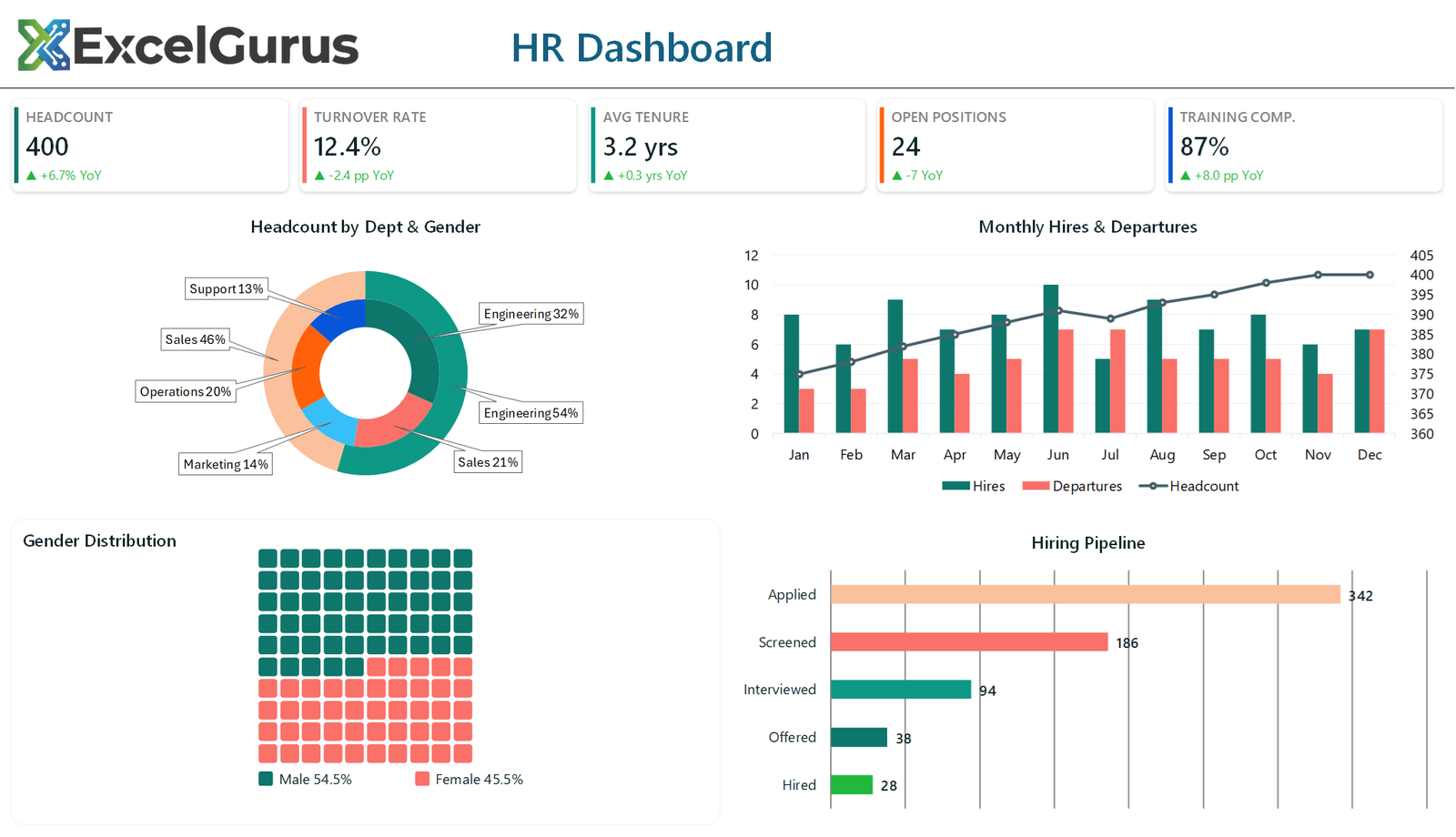
The top row displays five KPI cards: total headcount, turnover rate, average tenure, open positions, and training completion rate. Each card includes year-over-year change indicators so HR leadership can quickly identify positive or concerning trends.
A nested ring chart breaks down workforce composition by department and seniority level simultaneously, providing demographic visibility that would require multiple pivot tables to achieve manually. The waffle chart visualizes diversity or engagement percentages in a format that is both visually striking and easy to understand for non-technical stakeholders.
The recruitment funnel tracks candidates from application through offer acceptance, helping talent acquisition teams identify where candidates drop off. A horizontal bar chart shows department-level headcount with actual vs. planned comparisons, making it easy to spot understaffed teams.
How It Works
All visuals are generated by VBA from a single data input sheet. When HR updates their numbers — whether monthly, quarterly, or on-demand — the entire dashboard regenerates with one button click. No manual chart editing, no broken formulas, no inconsistent formatting.
Who It’s For
This dashboard is ideal for HR directors, people analytics teams, and COOs who want data-driven workforce insights without purchasing dedicated HR analytics software.
Technologies Used
Excel VBA · Nested Ring Charts · Waffle Charts · Funnel Visualization · HR Analytics
Ready to Build Something Like This?
Whether you track headcount, turnover, recruitment, or all three, we can build an HR dashboard that updates itself. → Start a Project